Tools & integrationsGuide
How to connect Cline to CheapTokens
Set up Cline's OpenAI Compatible provider — base URL, API key, model ID and model limits — and check that the coding agent works.
On this page
Cline is an AI coding agent for VS Code. It works with any OpenAI-compatible API, so connecting it to CheapTokens comes down to four fields: provider, base URL, key and model ID. The fields and screenshots below are from Cline 4.1.24: on October 15, 2026 we filled them in a live installation, and the model list loaded from the CheapTokens API.
Before you start#
- Cline is installed in your editor.
- You have a CheapTokens API key and a positive balance. If not, start with Your first API request.
Step 1. Choose the provider#
On first launch Cline asks How will you use Cline? — choose Bring my own API key and press Continue. If Cline is already set up, open its settings with the ⚙ icon at the top of the Cline panel.
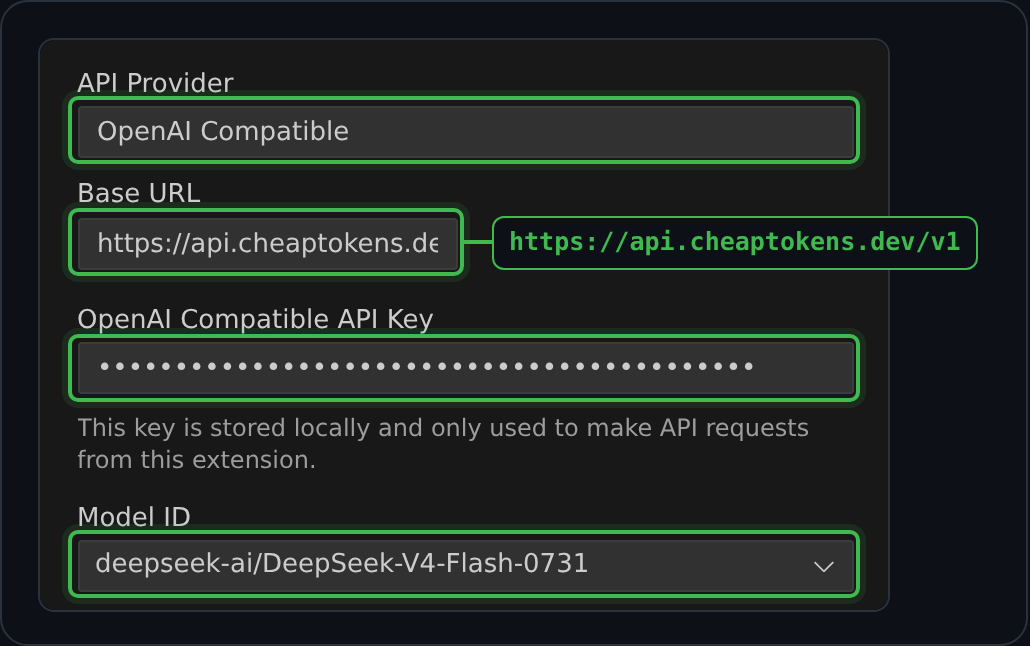
Set API Provider to OpenAI Compatible — start typing the name to filter the list.
Step 2. Base URL and key#
Scroll the table right →
| Field | Value |
|---|---|
| Base URL | https:/ |
| OpenAI Compatible API Key | your CheapTokens key |
The base URL must end with /v1. Without it the requests go to an address that doesn't exist and you get 404.
The Base URL field in Cline is narrow, so the end of the address is hidden — that's fine as long as the full value is https:/. The key is masked as you type.
Step 3. Model ID#
In Model ID choose the model. Once the base URL and key are filled in, Cline loads the model list from the API — it shows “Loading models…” — and Model ID turns into a drop-down with the CheapTokens models. Pick one; if the list doesn't load, check the address and the key. The full ID of the default model:
deepseek-ai/DeepSeek-V4-Flash-0731Which one to start with:
deepseek-— a good default for everyday edits: 380K context and up to 32,768 output tokens, so long files fit in one answer.ai/ DeepSeek- V4- Flash- 0731 zai-— for harder tasks that need reasoning; it reasons before answering, which makes answers slower and uses more output tokens.org/ GLM- 5. 3- Flash MiniMaxAI/— for agent workflows and automation; 200K context.MiniMax- M2. 7
Details and a cost example are in GLM vs DeepSeek vs MiniMax.
Step 4. Model Configuration#
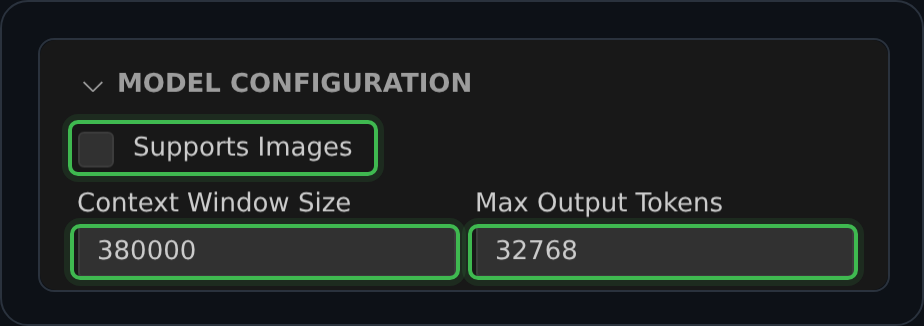
Cline doesn't know the limits of a custom model, so expand Model Configuration and fill them in. Supports Images is on by default — turn it off: all three models accept text only. The values come from GET https:/ (October 2026):
Scroll the table right →
| Setting | DeepSeek-V4-Flash | GLM-5.3-Flash | MiniMax-M2.7 |
|---|---|---|---|
| Supports Images | off | off | off |
| Context Window Size | 380000 | 390000 | 200000 |
| Max Output Tokens | 32768 | 8192 | 8192 |
Leave Reasoning Effort at None: this parameter isn't in the list the CheapTokens API supports (/v1/capabilities).
Input Price / 1M tokens and Output Price / 1M tokens only feed Cline's own cost estimate in the chat — the actual charge is calculated by CheapTokens. Copy the current prices from this table:
| Model | Context | Input $/1M | Output $/1M | OpenRouter in | OpenRouter out |
|---|---|---|---|---|---|
| GLM-5.3-Flash reasoning temporarily unavailable | 390K | $0.027 | $0.08 | $0.048 | $0.20 |
| DeepSeek-V4-Flash temporarily unavailable | 380K | $0.0221 | $0.10 | $0.016 | $0.64 |
| MiniMax-M2.7 temporarily unavailable | 200K | $0.05 | $0.15 | $0.30 | $1.20 |
Prices in USD per 1M tokens. OpenRouter figures shown for comparison and may change.
Below the model settings there is Use different models for Plan and Act modes. Leave it unchecked, and both modes — planning and making changes — use the same CheapTokens model.
Step 5. Check that it works#
On the first-run screen press Continue to save the settings. Start a new task, for example "Explain what this file does". If the answer arrives, you're set. If Cline shows an error, look at the status code:
- 401 — the key was pasted with a typo or extra spaces, or it was rotated. Paste the current key again.
- 404 — the base URL doesn't end with
/v1. - 400
Model "…" not found— the model ID has a typo or no prefix; copy it from/v1/models. - 402 — the balance is used up; top up in the dashboard.
More on each error: Common connection errors and how to fix them.
Recommending CheapTokens to other developers? The referral program credits you a percentage of their top-ups.


