Agents & automationGuide
Run dsh-superagent on a cheap model: GitHub issue to PR
Set up DeepSeek's dsh-superagent so an issue that mentions the agent account becomes a pull request, and estimate what one ticket costs in tokens.
On this page
You mention an agent in a new GitHub issue, go make tea, and come back to a pull request. That is what DeepSeek's dsh-superagent does, and you can run it on a CheapTokens model through DeepSeek Harness (DSH). Below: the install, the agent's own GitHub account, the first test issue, and a budget for one ticket.
One caveat from the repository itself. Its README (checked 2 November 2026) calls it a research prototype for reference only, not an official DeepSeek product, and says it may still contain bugs. It is MIT-licensed, has one commit on main and no releases. Run it on a repository you can afford to experiment on.
What it actually does#
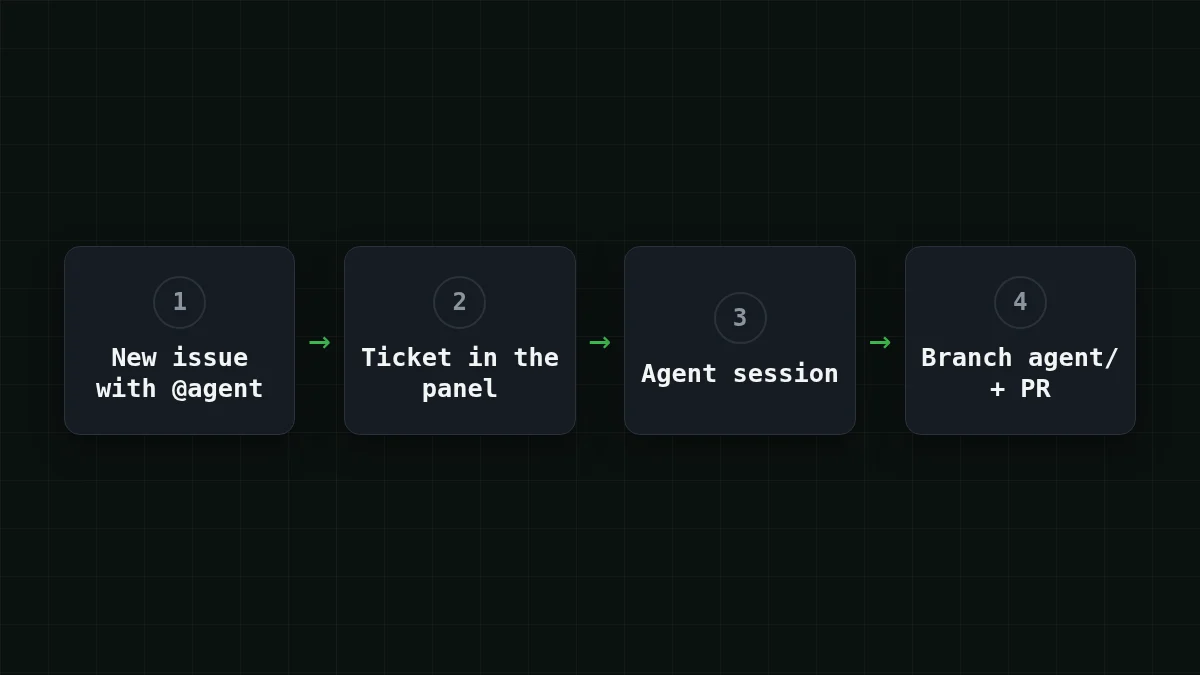
dsh-superagent is a proactive coding agent for one GitHub repository, packaged as a bundle for DeepSeek Harness. It listens to GitHub. When someone on your allowed list asks, it opens a work item (the docs call it a Ticket), works in its own agent session and its own directory, and replies in the original conversation, for example with a pull request. A web panel shows the items that need a person.
So one issue is one session, and one session is a loop of model calls. That loop is where the tokens go; if you have not seen why, why AI agents use so many tokens walks through a 20-step example.
Before you start#
You need, per the deployment doc:
- Node.js 22.19+ or 24+, pnpm, git 2.32+, tmux, Python 3.8+
- GitHub CLI 2.48+ (used through a small wrapper, see below)
- a repository on github.com (GitHub Enterprise Server is not supported)
- DSH in the version range from
engines.dshin the repo'spackage.json - a DSH model provider
The last item is the one the repository leaves to you: the setup guide calls the provider an operator step. For CheapTokens, connect DeepSeek Harness to CheapTokens first and come back. The model id to use is deepseek- (the full id, the short name from price tables is not accepted by the API), and the API base is https:/. Details are on the CheapTokens docs page.
One thing to watch. According to the deployment doc, setup strips environment variables whose names contain KEY, PASSWORD, SECRET or TOKEN, and removes GH_TOKEN and GITHUB_TOKEN from the worker environment. So a provider key exported in the shell will not reach the worker; set it up as described in the connect article.
Install and start#
Step by step
Install the bundle
Install DSH and the repo
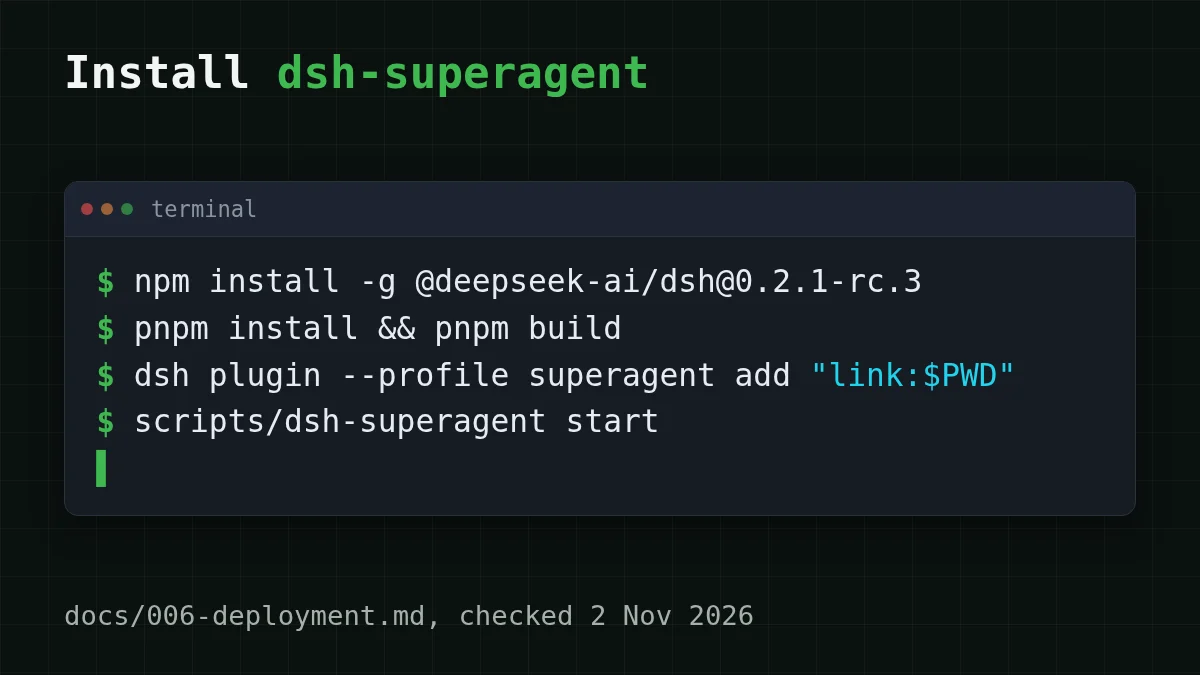
The doc (docs/006-deployment.md, checked 2 November 2026) pins a release candidate:
npm install -g @deepseek-ai/dsh@0.2.1-rc.3
git clone https://github.com/deepseek-ai/dsh-superagent-prototype dsh-superagent
cd dsh-superagent
pnpm install && pnpm build
Create the profile (fresh install only)
dsh superagent --from-default-profile web --dump-config > /dev/null
dsh plugin --profile superagent add "link:$PWD"
Run the first line only once. On an existing superagent profile it replaces the profile and deletes its cordis.patch.yml.
Add the config
Copy examples/ to ~/. The one required key is stateDir, an absolute path where the database, locks and worker files live. The webserver entry sets the port (3082 by default).
Start it
scripts/dsh-superagent start
scripts/dsh-superagent status
start runs inside a tmux session called dsh-superagent.
The status command answers with an exit code: 0 is normal, 1 means a restart may help, 2 means a part failed and a restart won't fix it, 3 means setup is still required. Start with the defaults: profile superagent, branch prefix agent/, and accept mode observe, which records proactive work without doing it.
Give the agent its own GitHub account#
This is the step people skip and then wonder why nothing happens. The agent needs a regular GitHub user with write access to your repository; a GitHub App cannot play this role.
- Create the user and add it as a collaborator with write access.
- Make a wrapper
~/:. local/ bin/ gh- agent GH_. That keeps the agent's login apart from your ownCONFIG_ DIR="$HOME/ . config/ gh- agent" exec gh "$@" gh. - Run
gh-as that user.agent auth login - In the web panel, open Sources, set the repository (
owner/name) and the CLI path to the wrapper. - Under Policy, add the logins that may give the agent work to
policy.. Nothing becomes a Ticket until someone is on that list.sources. github. allowed
Checklist
Before the first issue
Your first test issue#
Open a new issue in the repository and write something small and unambiguous, with the agent's login in code format, say: @<agent login> fix the typo in README..
The word "new" matters. Editing an old issue to add the mention is not picked up; a new issue or a new comment is. If the panel shows a Ticket and then a branch starting with agent/ appears, the chain works.
Try it yourselfTry it: nothing happens after your mention. What do you check first?Show answer
The allow-list. Until your login is in policy., nothing becomes a Ticket. After that, check that the mention was in a new issue or comment, not an edited one.
What one ticket costs#
The repository does not publish token usage per ticket, so this is an estimate built on stated assumptions. Say a small ticket takes 25 model calls. Each call carries the growing conversation: about 30,000 tokens of input on average, and about 800 tokens of answer (a command, a patch, a short note).
Per ticket that is 30,000 × 25 = 750,000 input tokens and 800 × 25 = 20,000 output tokens. On DeepSeek-V4-Flash at today's CheapTokens prices (input $0.015 and output $0.10 per 1M tokens), one such ticket is $0.0133.
The lopsided part: the input is about 37 times the output, and that is normal for agents, because every step re-sends what came before. The same ticket on other models:
| Model | Input $/1M | Output $/1M | Cost | OpenRouter |
|---|---|---|---|---|
| GLM-5.3-Flash | $0.02 | $0.04 | $0.0158 | $0.0268 |
| DeepSeek-V4-Flash | $0.015 | $0.10 | $0.0133 | $0.0553 |
| MiniMax-M2.7 | $0.05 | $0.15 | $0.0405 | $0.486 |
750,000 input and 20,000 output tokens in total. Prices per 1M tokens are current and change together with our tariffs; the OpenRouter column shows reference prices for the same workload.
The table also lists GLM-5.3-Flash (390K context, up to 8,192 output tokens per answer) if your tickets are short and answers are small. For long tool loops, DeepSeek-V4-Flash gives you a 380K context, up to 32,768 tokens per answer and one price at any hour. Your own numbers will differ, so move the sliders:
Cost calculator
A day with five tickets (25 calls each)
Input tokens per request: 30,000 · Output tokens per request: 800 · Requests per day: 125
| Model | Per day | Per month |
|---|---|---|
| GLM-5.3-Flash$0.02$0.04 | $0.079 | $2.37 |
| DeepSeek-V4-Flash$0.015$0.10 | $0.0663 | $1.99 |
| MiniMax-M2.7$0.05$0.15 | $0.203 | $6.08 |
If you want to cut the input side, how to estimate the cost of an AI agent covers the habits that matter most.
Keep it on a short leash#
Stay on observe mode for a day: it records what the agent would do on its own, so you see the pattern before it acts. Allow only your own login at first. Look at the first three pull requests line by line, and check the model usage on your balance after the first day, then multiply by your real ticket count.
The repo also says some designs from DeepSeek's accompanying article are not implemented yet, so treat missing features as unfinished, not as your mistake.
Sources#
All repository facts come from deepseek-ai/dsh-superagent-prototype (README, SETUP.md, docs/006-deployment.md), checked on 2 November 2026. The repository page shows no commit date and the DSH version 0.2.1-rc.3 is a release candidate, so re-check the doc before you install.


