How can we help?
Search answers, setup guides and docs — or write to us.
Use the up and down arrows to move through results and Enter to open one.
Service status Checking model status… Models and status
Getting started
From sign-up to your first request.
How do I get an API key?
Sign up — new accounts get 1.3M+ free tokens. Your API key appears in the dashboard as soon as your account has a balance. Copy it right away: it is shown only once.
Which base URL do I use?
OpenAI-compatible SDKs and tools use https://api.cheaptokens.dev/v1. Anthropic-compatible clients, including Claude Code, use the root address https://api.cheaptokens.dev and add the path themselves. If your client adds /v1 on its own, give it the root address too.
How do I make my first request?
Put your key in the CHEAPTOKENS_API_KEY environment variable and run the request below. The quickstart builds the same snippet for Python, Node and the Anthropic SDK, with the model of your choice.
curl https://api.cheaptokens.dev/v1/chat/completions \
  -H "Authorization: Bearer $CHEAPTOKENS_API_KEY" \
  -H "Content-Type: application/json" \
  -d '{
    "model": "zai-org/GLM-5.3-Flash",
    "messages": [{"role": "user", "content": "Hello"}]
}'How do I connect Cursor, Cline, Claude Code or another tool?
Any tool that speaks the OpenAI or Anthropic API works: set the base URL, paste your key and add the model ID. Each guide shows where these settings are in the tool.
Which model should I choose?
All models work with the same key and the same address — to switch, change the model ID. Each card on the models page lists the context window, maximum output and price.
- GLM-5.3-Flash For complex coding & reasoning
- DeepSeek-V4-Flash For everyday tasks on a budget
- MiniMax-M2.7 For agents & workflow automation
Still have a question? Ask us
Connect a tool
Choose your tool or SDK to see only the settings it needs. The key in the examples is a placeholder — paste your own key in the tool.
Cursor OpenAI-compatible
Cursor — in Cursor Settings → Models, paste your key into OpenAI API Key, turn on Override OpenAI Base URL and add the model ID as a custom model. Per Cursor's documentation, own keys work with chat models only; Tab completion keeps using Cursor's models.
- Base URL
-
https://api.cheaptokens.dev/v1 - API key
-
YOUR_CHEAPTOKENS_KEYSent asAuthorization: Bearer <key>. - Model ID
-
zai-org/GLM-5.3-Flash
Use the address with /v1: the SDK or tool adds /chat/completions itself.
# Cursor Settings → Models → API Keys
OpenAI API Key:           YOUR_CHEAPTOKENS_KEY
Override OpenAI Base URL: https://api.cheaptokens.dev/v1
# Models list → add this ID as a custom model:
Model: zai-org/GLM-5.3-FlashCline OpenAI-compatible
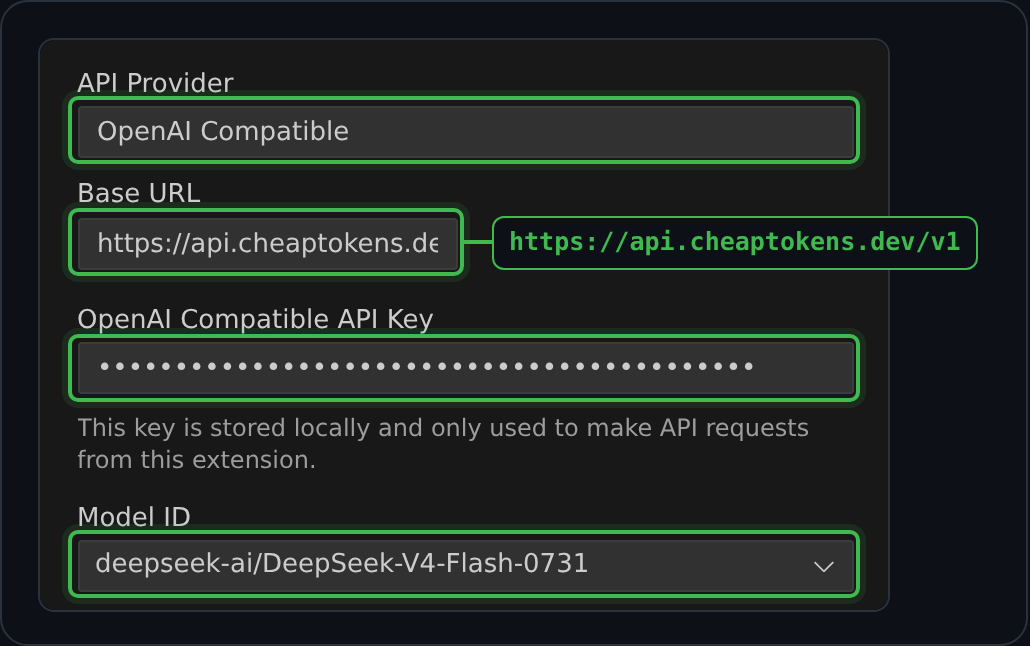
Cline — choose an OpenAI-compatible provider, set base URL and key.
- Base URL
-
https://api.cheaptokens.dev/v1 - API key
-
YOUR_CHEAPTOKENS_KEYSent asAuthorization: Bearer <key>. - Model ID
-
zai-org/GLM-5.3-Flash
Use the address with /v1: the SDK or tool adds /chat/completions itself.
# Cline → Settings → API Provider: OpenAI Compatible
Base URL: https://api.cheaptokens.dev/v1
API Key:  YOUR_CHEAPTOKENS_KEY
Model ID: zai-org/GLM-5.3-Flash
Where to find these settings
Claude Code Anthropic-compatible
Claude Code — export the variables below (the address has no /v1) and run claude.
- Base URL
-
https://api.cheaptokens.dev - API key
-
YOUR_CHEAPTOKENS_KEYSent asx-api-key: <key>;Authorization: Bearer <key>works too. - Model ID
-
zai-org/GLM-5.3-Flash
Use the root address without /v1: the client adds /v1/messages itself.
# Claude Code → cheaptokens (Anthropic-compatible)
export ANTHROPIC_BASE_URL="https://api.cheaptokens.dev"
export ANTHROPIC_API_KEY="YOUR_CHEAPTOKENS_KEY"
export ANTHROPIC_MODEL="zai-org/GLM-5.3-Flash"
export ANTHROPIC_DEFAULT_HAIKU_MODEL="zai-org/GLM-5.3-Flash"OpenClaw OpenAI- or Anthropic-compatible
OpenClaw — add the provider entry below to ~/.openclaw/openclaw.json. On a fresh install, openclaw onboard with the Custom provider choice writes the same entry.
- Base URL · OpenAI-compatible
-
https://api.cheaptokens.dev/v1 - Base URL · Anthropic-compatible
-
https://api.cheaptokens.dev - API key
-
YOUR_CHEAPTOKENS_KEYSent asAuthorization: Bearer <key>.Sent asx-api-key: <key>;Authorization: Bearer <key>works too. - Model ID
-
zai-org/GLM-5.3-Flash
For OpenAI-style requests use the address with /v1; for Anthropic-style requests — the root address.
// ~/.openclaw/openclaw.json — add cheaptokens as a provider
{
  models: {
    providers: {
      cheaptokens: {
        baseUrl: "https://api.cheaptokens.dev/v1",
        apiKey: "YOUR_CHEAPTOKENS_KEY",
        api: "openai-completions",
        models: [{ id: "zai-org/GLM-5.3-Flash", name: "GLM-5.3-Flash" }],
      },
    },
  },
  agents: {
    defaults: { model: { primary: "cheaptokens/zai-org/GLM-5.3-Flash" } },
  },
}
// Anthropic-style requests instead? In the provider entry use:
// api: "anthropic-messages", baseUrl: "https://api.cheaptokens.dev"Aider OpenAI-compatible
Aider — pass --openai-api-base and --openai-api-key (or env vars).
- Base URL
-
https://api.cheaptokens.dev/v1 - API key
-
YOUR_CHEAPTOKENS_KEYSent asAuthorization: Bearer <key>. - Model ID
-
zai-org/GLM-5.3-Flash
Use the address with /v1: the SDK or tool adds /chat/completions itself.
export OPENAI_API_BASE="https://api.cheaptokens.dev/v1"
export OPENAI_API_KEY="YOUR_CHEAPTOKENS_KEY"
aider --model openai/zai-org/GLM-5.3-FlashKilo Code OpenAI-compatible
Kilo Code — choose the OpenAI-compatible provider, set base URL, key, and model id.
- Base URL
-
https://api.cheaptokens.dev/v1 - API key
-
YOUR_CHEAPTOKENS_KEYSent asAuthorization: Bearer <key>. - Model ID
-
zai-org/GLM-5.3-Flash
Use the address with /v1: the SDK or tool adds /chat/completions itself.
# Kilo Code → Settings → API Provider: OpenAI Compatible
Base URL: https://api.cheaptokens.dev/v1
API Key:  YOUR_CHEAPTOKENS_KEY
Model ID: zai-org/GLM-5.3-FlashPython · OpenAI OpenAI-compatible
- Base URL
-
https://api.cheaptokens.dev/v1 - API key
-
YOUR_CHEAPTOKENS_KEYSent asAuthorization: Bearer <key>. - Model ID
-
zai-org/GLM-5.3-Flash
Use the address with /v1: the SDK or tool adds /chat/completions itself.
from openai import OpenAI

client = OpenAI(
    base_url="https://api.cheaptokens.dev/v1",
    api_key="YOUR_CHEAPTOKENS_KEY",
)
resp = client.chat.completions.create(
    model="zai-org/GLM-5.3-Flash",
    messages=[{"role": "user", "content": "Hello"}],
)
print(resp.choices[0].message.content)Node · OpenAI OpenAI-compatible
- Base URL
-
https://api.cheaptokens.dev/v1 - API key
-
YOUR_CHEAPTOKENS_KEYSent asAuthorization: Bearer <key>. - Model ID
-
zai-org/GLM-5.3-Flash
Use the address with /v1: the SDK or tool adds /chat/completions itself.
import OpenAI from "openai";

const client = new OpenAI({
  baseURL: "https://api.cheaptokens.dev/v1",
  apiKey: process.env.CHEAPTOKENS_API_KEY,
});
const resp = await client.chat.completions.create({
  model: "zai-org/GLM-5.3-Flash",
  messages: [{ role: "user", content: "Hello" }],
});
console.log(resp.choices[0].message.content);Python · Anthropic Anthropic-compatible
- Base URL
-
https://api.cheaptokens.dev - API key
-
YOUR_CHEAPTOKENS_KEYSent asx-api-key: <key>;Authorization: Bearer <key>works too. - Model ID
-
zai-org/GLM-5.3-Flash
Use the root address without /v1: the client adds /v1/messages itself.
from anthropic import Anthropic

client = Anthropic(
    base_url="https://api.cheaptokens.dev",
    api_key="YOUR_CHEAPTOKENS_KEY",
)
msg = client.messages.create(
    model="zai-org/GLM-5.3-Flash",
    max_tokens=1024,
    messages=[{"role": "user", "content": "Hello"}],
)
print(msg.content[0].text)curl OpenAI-compatible
- Base URL
-
https://api.cheaptokens.dev/v1 - API key
-
YOUR_CHEAPTOKENS_KEYSent asAuthorization: Bearer <key>. - Model ID
-
zai-org/GLM-5.3-Flash
Use the address with /v1: the SDK or tool adds /chat/completions itself.
curl https://api.cheaptokens.dev/v1/chat/completions \
  -H "Authorization: Bearer $CHEAPTOKENS_API_KEY" \
  -H "Content-Type: application/json" \
  -d '{
    "model": "zai-org/GLM-5.3-Flash",
    "messages": [{"role": "user", "content": "Hello"}]
}'Quick reference: addresses, key header, model IDs, limit
- OpenAI-compatible base URL
https://api.cheaptokens.dev/v1- Anthropic-compatible base URL
https://api.cheaptokens.dev- API key header
Authorization: Bearer <key>Anthropic clients: x-api-key- Model IDs
zai-org/GLM-5.3-Flashdeepseek-ai/DeepSeek-V4-Flash-0731MiniMaxAI/MiniMax-M2.7
- Rate limit
- 120 requests per minute per key
Balance and payments
Pay as you go from one USD balance.
How does payment work?
There is no subscription. You top up a USD balance, and each request is charged at the model's fixed rate per million input and output tokens. One balance covers every model.
How do I top up?
In the dashboard, press Top up and choose the amount in USD. Pay with crypto (no KYC) or by card through a partner — the funds are credited to your balance automatically.
My payment is still processing
A crypto top-up is credited automatically once the network confirms the transaction — how long that takes depends on the coin. If you pay by card through a partner, the balance is topped up 5–30 minutes after payment.
- Check
- The status on the payment page: the full amount is paid, in the coin and network the page shows.
- Fix
- Wait — there's nothing to resend. You can close the payment page: the top-up is credited without it.
- Make sure it works
- The balance in the dashboard grows by the top-up; after your first top-up the API key appears there too.
- Still failing? Send us
- If the payment page shows the payment as complete but the balance hasn't changed within 30 minutes — see the next answer.
I paid, but my balance didn't change
Payments are matched to your account automatically. If the notification about a crypto payment was lost, a regular check picks the payment up within minutes.
- Check
- The payment page or your wallet: the payment is complete. A crypto invoice must receive the full amount — a payment that arrived short is checked by hand. If you pay by card through a partner, the partner must send USDT on the TRC20 (Tron) network to your recipient address: other coins and networks are not credited.
- Fix
- Give it 30 minutes after the payment is complete. If the balance still hasn't changed, write to us — don't pay again.
- Make sure it works
- The dashboard shows the top-up in your balance.
- Still failing? Send us
- The payment method, the amount, when you paid and the payment ID or transaction hash from the payment page or your wallet.
The top-up failed with an error
Most often the amount is below the minimum — $5 with crypto, $10 by card through a partner — or the payment service didn't respond for a moment.
- Check
- The amount and the exact error text in the top-up window.
- Fix
- Reload the dashboard and try again in a few minutes. If paying by card through a partner fails, the top-up window offers a second partner.
- Make sure it works
- The payment page opens with your amount; after payment the balance grows.
- Still failing? Send us
- The payment method, the amount, the time and the exact error text — a screenshot helps.
Does my balance expire?
No. Unused balance does not expire, so you can top up once and spend it at your own pace.
What happens when my balance runs out?
Requests return 402 and your key is paused. Top up, and the same key works again — you don't need a new one.
Where can I see my spending?
In the dashboard: your balance, how much you have spent, and usage by model and by day.
Why are the prices lower?
We run open-weight models on cost-efficient infrastructure and publish fixed USD rates per million input and output tokens for each model — no subscriptions or plans.
Still have a question? Ask us
API and errors
What a status code means and how to fix it.
401 Invalid API key
The API doesn't recognize the key: it is mistyped, belongs to another service, or was replaced — after Rotate the old key stops working.
- Check
- The key in your tool is the current one, without spaces, quotes or line breaks, and the header is exactly
Authorization: Bearer <key>(Anthropic clients:x-api-key). - Fix
- Paste the current key again. Lost it? Press Rotate in the dashboard and update the key everywhere you use it.
- Make sure it works
- Send a short request: an answer instead of 401 means the key works.
- Still failing? Send us
- The time of the request, the tool or SDK and the error text — never the key itself.
402 Request refused: no balance or no key
The request was refused before it reached the model, for one of two reasons. The error text tells them apart: Total limit exceeded — the balance is used up or too low for this request; no active billing account — the request carries no API key.
- Check
- Your balance in the dashboard, and that the request sends the key as
Authorization: Bearer <key>— “Bearer” with a capital B and a space before the key — or asx-api-key. A lowercasebeareror a key without “Bearer” counts as no key. - Fix
- Balance used up: press Top up in the dashboard — the same key works again once the top-up is credited. No key: add it to your tool or environment variable, then restart the tool or the terminal.
- Make sure it works
- In the dashboard the key shows Active, and a short request returns an answer.
- Still failing? Send us
- If the balance is positive and the key is sent but 402 remains: the time of the request, the model and the full error text.
429 Too many requests
Requests come faster than allowed. The limit is 120 requests per minute per API key, counted in one-minute windows. A 429 can also mean the service or a model is briefly busy.
- Check
- The error text:
Rate limit exceeded— your key hit the per-minute limit;at capacity,waiting for an available upstream slotoroverloaded— the service or the model is busy. - Fix
- Wait the number of seconds in the
Retry-Afterheader and repeat — the official OpenAI and Anthropic SDKs retry a 429 on their own, twice by default. For agents, limit how many requests run in parallel; if one model stays busy, switch themodelfield. - Make sure it works
- Requests return answers again, and at a steady pace below the limit the 429s stop.
- Still failing? Send us
- If 429 comes at a low request rate: the time, the model, how many requests you send per minute and the error text.
404 · 400 Wrong address or model not found
A 404 means the address is wrong. A 400 that says “not found” means the API doesn't know the model ID.
- Check
- OpenAI-style clients need the address with
/v1: make sure it isn't missing, or doubled because the client adds/v1itself. The model ID must be complete, with the prefix before the slash, for examplezai-org/GLM-5.3-Flash. - Fix
- Copy the address and the model ID from the settings for your tool on this page, or take the ID from
GET /v1/models. - Make sure it works
- A short request returns an answer, and
GET /v1/modelslists the same ID. - Still failing? Send us
- The full address you call, the model ID and the error text.
503 Model temporarily unavailable
The model can't take requests right now. The service status at the top of this page and the model cards show the same state.
- Check
- The service status above: is this model marked as temporarily unavailable?
- Fix
- Repeat the request in a minute, with growing pauses — a 503 has no
Retry-Afterheader; the official SDKs retry it twice on their own. Or switch themodelfield to another model — the key and the address stay the same. - Make sure it works
- The model shows as available again, and a short request returns an answer.
- Still failing? Send us
- If the status shows the model as available but 503 continues: the time, the model and the error text.
length The answer stops mid-sentence
The answer hit a length limit: finish_reason is length. Without max_tokens, a non-streaming answer stops at the model's default length.
- Check
- The
finish_reasonfield and themax_tokensyou send — the docs list the default and the maximum output for each model. - Fix
- Set
max_tokensfor longer answers, up to the model's maximum, or stream the response: withoutmax_tokens, a streamed answer can run up to the maximum. - Make sure it works
- The answer ends with
finish_reasonstop. - Still failing? Send us
- If an answer ends with
lengthwell below yourmax_tokens, the stream was interrupted — repeat the request, and if it keeps happening, send us the time, the model and yourmax_tokens.
timeout The answer takes long or times out
Reasoning models think before they answer, so the first token can take a while, and long answers take minutes. The API waits up to 150 seconds for a model to start answering.
- Check
- Whether you stream the response, and your client's timeout: it should be longer than 150 seconds.
- Fix
- Stream the response (
stream: true): tokens arrive as they are generated, and keep-alive messages hold the connection open. Without streaming, keep the client timeout above 150 seconds — the official OpenAI and Anthropic SDKs wait 10 minutes by default; in Claude Code it isAPI_TIMEOUT_MS, in Aider--timeout, in OpenClawtimeoutSecondsof the provider. If a streamed answer breaks off, repeat the request: the output of an interrupted answer isn't charged. - Make sure it works
- The first tokens appear in the stream, or the full answer arrives within the timeout.
- Still failing? Send us
- The time, the model, whether you stream, your client timeout and where the answer stopped; the
x-request-idresponse header, if your tool shows it.
Still have a question? Ask us
Account and sign-in
Signing in and keeping your key safe.
How do I sign in?
Enter your email, and we'll send you a magic link — no password needed. You can also continue with Google, MetaMask, or GitHub.
The sign-in email didn't arrive
Each sign-in link works once and for a limited time, and only the newest one opens.
- Check
- The spam and promotions folders, and the spelling of the address on the login page.
- Fix
- Request a new link on the login page and open the newest email.
- Make sure it works
- The link opens the dashboard with your account.
- Still failing? Send us
- The address you sign in with and when you requested the link — the form on this page works without signing in.
I lost my API key
The dashboard shows a key only once. Press Rotate to get a new one — the old key stops working, so update it everywhere you use it.
Still have a question? Ask us
Referral program
Earn from the top-ups of the people you invite.
How does the referral program work?
Share your referral link. You get 10% of every balance top-up made by people who sign up with it — for as long as they use CheapTokens.
Where do I find my referral link?
In the dashboard, on the Referral program tab: sign up or log in and copy it there.
What do the people I invite get?
1.3M+ free tokens at sign-up and 52M+ more after their first top-up of $5 or more.
How do I use my rewards?
Each reward is on hold for 7 days after the top-up, then becomes available on your referral balance. Move it to your API balance, or withdraw USDT from $20.
Still have a question? Ask us
Didn't find your answer?
Send us a message — it goes straight to the team, and we'll reply by email.
Never send your API key — we don't need it to help.
Prefer email? Write to support@cheaptokens.dev.