Models & comparisonsComparison
Nemotron Bolt E4B or a hosted API? Choose by context and task
Does a 4 GB local model fit your job? Check the 64K context, answer length and cost per task against hosted models, with a decision table and live costs.
On this page
If your task fits inside 64,000 tokens and your GPU has room for a ~4 GB model, NVIDIA's Nemotron 3.5 Bolt E4B can run it on your own machine. If the job needs a bigger window, a long answer, or 20,000 items finished today, a hosted model is the shorter road. Below is a table that sorts your task, and the arithmetic behind each row.
The hosted side of the comparison uses the three models on the CheapTokens models page: DeepSeek-V4-Flash, GLM-5.3-Flash and MiniMax-M2.7.
What NVIDIA published, and what it left out#
NVIDIA's research page for Nemotron 3.5 Bolt E4B (released 23 October 2026, checked 5 November) describes a model built on Gemma 4 E4B and shipped as a GGUF checkpoint, Q4_K_M quantization, for llama.cpp. NVIDIA says it fits in as little as 4 GB; the VRAM it measured ran from 3.1 to 5.0 GB (on NVIDIA's test workload; with a full 64K window memory use will be higher, so check on your own card). The weights are on Hugging Face as nvidia/ and also come through Ollama, LM Studio and Unsloth.
Three facts decide most choices:
- Context: 64K tokens. NVIDIA is explicit that the window holds everything at once: chat history, instructions, tool definitions and retrieved text.
- Languages: 35, from a base model pre-trained on more than 140.
- Speed: in NVIDIA's llama.cpp CUDA runs (Q4_K_M, batch size 1) an RTX 5070 with 12 GB used 3.5 GB of VRAM and produced 133.4 tokens per second. A Jetson Orin Nano with 8 GB used 4.2 GB and produced 15.5 tokens per second. Both numbers come from NVIDIA's own test workload, so expect yours to differ.
The page also lists tool-use scores (BFCL-v3 68.5, Tau2-Bench 55.1) and RULER at 64K of 87.0. These are the developer's own benchmarks: they say what the model was tested on, not how it stacks up against a hosted model, so this article doesn't line them up.
Two things the page doesn't state: how long a single answer can be, and the licence. Read both on the Hugging Face model card before you build anything on it.
How big is 64K when an agent starts working?#
Think of the window as a desk. The model can only work with what is lying on it right now, and the history, your instructions, the tool definitions and any retrieved text all share the same desk. So how much desk is 64K?
Guess the number
How many words of plain English fit in 64K tokens if the whole window were text?
Your guess
0100,000
Show answer
Answer: 48,000
About 48,000: by a rough rule of ¾ of a word per token (an assumption; tokenizers differ), 64,000 × 0.75 = 48,000. In practice instructions, tool definitions and history take their share first.
That is a short novel, so a chat, an email or a translation sits comfortably. The squeeze comes from agents, because every step drops its tool output onto the desk and nothing leaves.
Try it yourselfTry it: how many tool-calling steps fit before a 64K window is full?Show answer
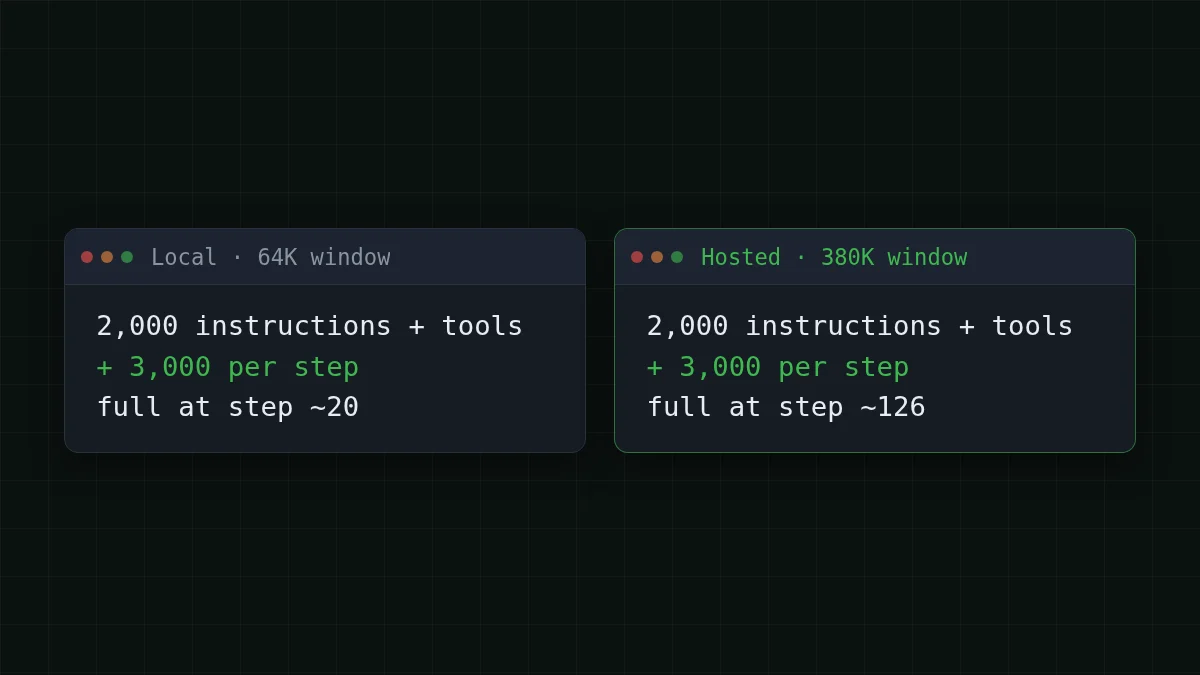
Say the instructions and tool definitions take 2,000 tokens, and each step adds 3,000 tokens of tool output and the model's reply. Those are assumptions; count your own.
(64,000 − 2,000) ÷ 3,000 = 20.7, so the window is full around step 20.
On a 380K window the same agent gets (380,000 − 2,000) ÷ 3,000 = 126 steps.
Real agents get around this by trimming or summarizing old steps. It works, but it is extra code to write and to debug. The cost side of the same loop is in Agent session cost: 50 steps on GLM, DeepSeek or MiniMax.
Sort your task: local or hosted#
The same question for a big open model is answered in Run DeepSeek locally or use an API. For a 4 GB model the answer depends on the task, so sort the task first and install second.
Scroll the table right →
| Your task | Bolt E4B on your GPU | Hosted API |
|---|---|---|
| Chat, short emails, translation (35 languages) | Fits: history stays far below 64K | Fits too; choose by price |
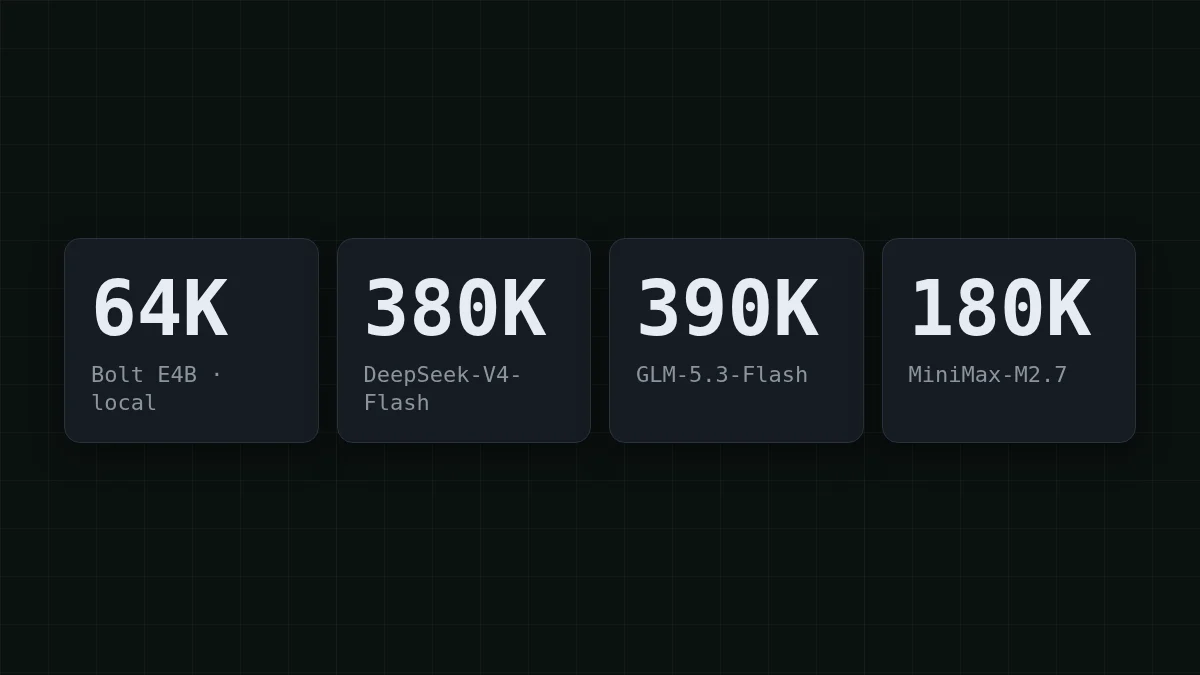
| Tool-calling assistant, sessions of about 20 steps | Fits if tool output is small | More headroom: 180K to 390K |
| Agent loop of 50+ steps | Window fills around step 20 (see above) | 380K, 390K or 180K |
| One document over 64K tokens | Does not fit as a single prompt | One request, up to the model's context |
| Bulk job, tens of thousands of items | For example, 20,000 labels: about 2 h on an RTX 5070 and about 18 h on a Jetson Orin Nano (NVIDIA's speeds, generation only) | Separate requests, billed per token |
| Reports or whole code files in one answer | Maximum output not stated by NVIDIA | Up to 32,768 tokens (DeepSeek) or 8,192 (GLM, MiniMax) |
The hosted columns come from the CheapTokens model list. DeepSeek-V4-Flash has a 380K context, up to 32,768 output tokens per answer and one price at any hour. GLM-5.3-Flash has a 390K context and up to 8,192 output tokens. MiniMax-M2.7 has a 180K context, up to 8,192 output tokens, and suits agentic and coding work through an API.
One row the table can't capture: if the text must never leave your machine, that settles it in favor of local.
Bulk jobs: hours of GPU time or a small bill#
Say you tag 20,000 support tickets. Each one is about 600 tokens in and a 50-token label out.
Totals: 20,000 × 600 = 12,000,000 input tokens and 20,000 × 50 = 1,000,000 output tokens.
Generating those 1,000,000 tokens at NVIDIA's measured speeds takes 1,000,000 ÷ 133.4 = 7,496 s (about 2.1 hours) on the RTX 5070 and 1,000,000 ÷ 15.5 = 64,516 s (about 17.9 hours) on the Jetson Orin Nano. That counts generation only: reading the 12 million input tokens comes on top, and so does the electricity the card burns the whole time.
The hosted side of the same job, at current prices:
| Model | Input $/1M | Output $/1M | Per request | 20,000 requests | OpenRouter, 20,000 requests |
|---|---|---|---|---|---|
| GLM-5.3-Flash | $0.02 | $0.04 | $0.000014 | $0.28 | $0.485 |
| DeepSeek-V4-Flash | $0.015 | $0.10 | $0.000014 | $0.28 | $0.98 |
| MiniMax-M2.7 | $0.05 | $0.15 | $0.000038 | $0.75 | $9.00 |
600 input and 50 output tokens per request. Prices per 1M tokens are current and change together with our tariffs; the OpenRouter column shows reference prices for the same workload.
The table prices the job on each model, with an OpenRouter column. In total, with input and output counted together, each of them comes out cheaper than OpenRouter. On DeepSeek-V4-Flash, for instance, the 1,000,000 output tokens are billed at $0.10 per 1M.
Your job is probably not 20,000 tickets. Put your own numbers in:
Cost calculator
A support bot for one day: tokens per request and requests per day
Input tokens per request: 1,500 · Output tokens per request: 300 · Requests per day: 2,000
| Model | Per day | Per month |
|---|---|---|
| GLM-5.3-Flash$0.02$0.04 | $0.084 | $2.52 |
| DeepSeek-V4-Flash$0.015$0.10 | $0.105 | $3.15 |
| MiniMax-M2.7$0.05$0.15 | $0.24 | $7.20 |
Now you have both sides in the same units: hours of a machine you own against dollars on a live table.
Long documents and long answers#
Take a contract bundle of 120,000 tokens. It is bigger than 64,000, so a local Bolt E4B would need the bundle cut into pieces, asked piece by piece, and the answers stitched together. On a 380K window it goes in as one request: with a 2,000-token answer that is $0.002 at current prices. Which model fits a 100K-token document goes through the context and output limits model by model.
Long answers are the other limit. DeepSeek-V4-Flash can write up to 32,768 tokens in one answer, and at the same rough ¾ word per token (an assumption) 32,768 × 0.75 = 24,576 words, which is a long report or a whole code file. NVIDIA's page gives no maximum for Bolt E4B, so before you plan a 10,000-token output locally, test what your runtime actually returns.
Route by size: the same code, two destinations#
You don't have to pick one forever. Keep the small model for the small jobs and send the big ones to a hosted model. If your tool already talks to an OpenAI-compatible endpoint, the switch is a base URL, a key and a full model id.
import os
from openai import OpenAI

hosted = OpenAI(
    base_url='https://api.cheaptokens.dev/v1',
    api_key=os.environ['CHEAPTOKENS_API_KEY'],
)

def too_big_for_local(text: str, limit: int = 60_000) -> bool:
    return len(text) // 4 > limit  # rough: about 4 characters per token in English

document = open('contract.txt', encoding='utf-8').read()
if too_big_for_local(document):
    resp = hosted.chat.completions.create(
        model='deepseek-ai/DeepSeek-V4-Flash-0731',
        messages=[{'role': 'user', 'content': 'List the termination clauses:\n\n' + document}],
        max_tokens=2000,
    )
    print(resp.choices[0].message.content)
    print(resp.usage)
The 60,000 limit leaves room under the 64K window for instructions and the answer. When the call works you see the answer text, then a usage object with prompt_tokens and completion_: multiply those by the prices on the pricing page to get what the request cost. The first-request steps are in the docs.
Start with the row of the table that matches your job. If it says local, download the GGUF and measure your own tokens per second before you plan around anyone's numbers.


