Getting startedGuide
List models with GET /v1/models to find the exact model id
One GET request shows the exact model ids with context and output limits. Copy the id, set max_tokens, and pick a first model for your task.
On this page
Your code returns a 404 on a model name that looked fine in someone else's example. Ask the API itself: one GET request to https:/ lists the models you can call, with their context and output limits. Copy the id from that answer, not from memory, and check the limit before you set max_tokens.
The docs page (CheapTokens docs, checked 28 October 2026) describes GET /v1/models as the list of callable models with context and output limits. Next to it sit GET / for one model and GET /. Chat itself goes through POST / (OpenAI-compatible) or POST / (Anthropic-compatible).
Why the same model has a different id everywhere#
Say you found a tutorial for another provider. It uses model: "deepseek-, you paste it next to the CheapTokens base URL, and the request fails. Nothing is wrong with your key. Providers name the same model differently: a prefix like deepseek-ai/, a version suffix like -0731, different capitalisation. The API accepts only the exact string it lists, and a short name taken from a price label will not work either.
That is the whole reason to look the id up once. If you want the full story of what a wrong id looks like on screen, API 401 or 404 error: wrong key, base URL or model id walks through it. This guide is the step before: find the right id so you never see that error.
Ask the API: one request#
Pick the tab you use. Both send the same request. In both examples the key comes from the CHEAPTOKENS_ environment variable (the key is in the dashboard once there are funds on the balance).
One request, two ways
curl
export CHEAPTOKENS_API_KEY="sk-your-key"

curl https://api.cheaptokens.dev/v1/models \
  -H "Authorization: Bearer $CHEAPTOKENS_API_KEY"
Python
import json
import os

import requests

resp = requests.get(
    "https://api.cheaptokens.dev/v1/models",
    headers={"Authorization": f"Bearer {os.environ['CHEAPTOKENS_API_KEY']}"},
    timeout=30,
)
resp.raise_for_status()
print(json.dumps(resp.json(), indent=2))
The Python version prints the raw JSON on purpose. Read it once with your own eyes: you are looking for the model ids and, next to them, the context and output limits. Copy each id from the printout in full.
The three ids and their limits#
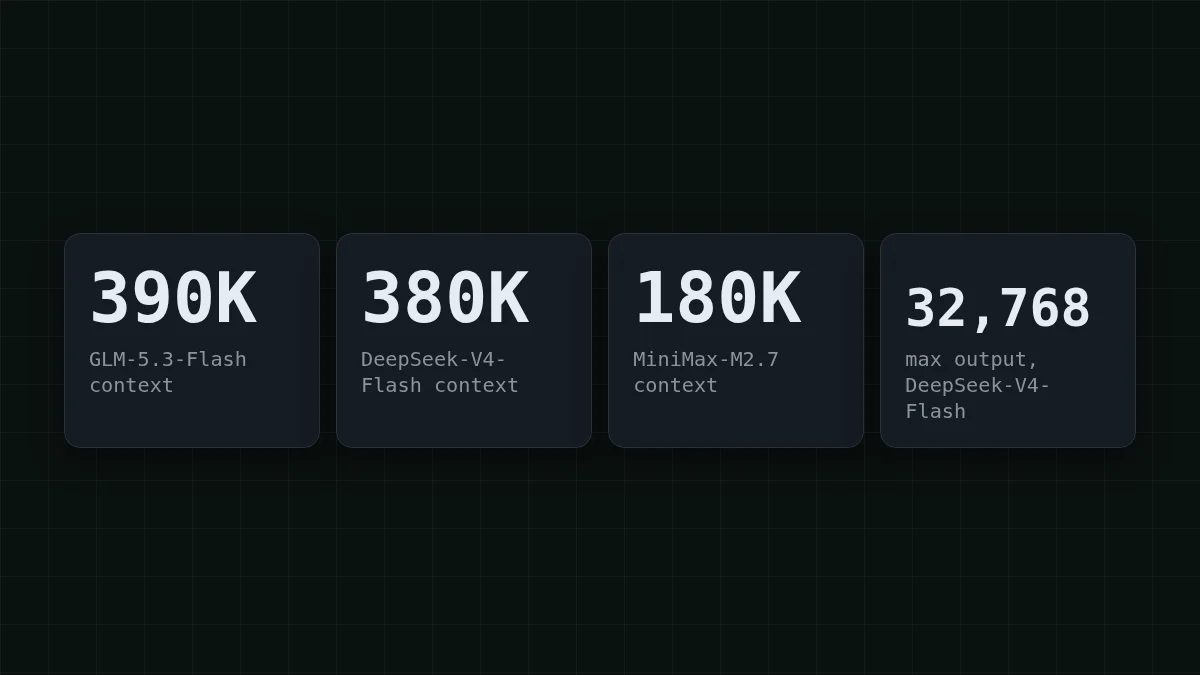
The docs list these callable models (checked 28 October 2026). Send the string in code formatting at the start of each line as model:
zai-— 390K context, up to 8,192 output tokens.org/ GLM- 5. 3- Flash deepseek-— 380K context, up to 32,768 output tokens.ai/ DeepSeek- V4- Flash- 0731 MiniMaxAI/— 180K context, up to 8,192 output tokens.MiniMax- M2. 7
Two numbers matter for most decisions. Context is how much the model can hold in one request, your prompt and its answer together. Output limit is the longest single answer. If these words are new, how to read AI model names and why an answer stops mid-sentence explain them in plain language.
Pick a first model for your task#
You do not need a long benchmark study to start. Two questions settle most first choices: how big is your input, and how long must the answer be? Click the case closest to yours.
Pick your case
Which case is yours?
Choose an option to see the answer
I paste a long document
Take zai-. It has the largest window of the three, 390K, so a long document and the question about it fit in one request. Its answers top out at 8,192 tokens, which is plenty for a summary or an extraction.
I need long answers (up to 32,768 tokens)
Take deepseek-. It allows up to 32,768 output tokens per answer and has a 380K window, so long generated text and an agent loop both fit.
I write code with a moderate prompt
Take MiniMaxAI/. A 180K window covers a few files and the conversation around them; the answer can run up to 8,192 tokens.
All three share one balance and one price at any time of day, with no peak hours, so switching later costs you a single changed string. Compared with OpenRouter, each of the three is cheaper in total, with input and output counted together. Here is what a workload looks like: say you run a small assistant that sends 2,000 input tokens and gets 500 back, 1,000 times a day. The live table below prices exactly that.
| Model | Input $/1M | Output $/1M | Per request | 1,000 requests | OpenRouter, 1,000 requests |
|---|---|---|---|---|---|
| GLM-5.3-Flash | $0.02 | $0.04 | $0.00006 | $0.06 | $0.121 |
| DeepSeek-V4-Flash | $0.015 | $0.10 | $0.00008 | $0.08 | $0.173 |
| MiniMax-M2.7 | $0.05 | $0.15 | $0.00018 | $0.175 | $1.20 |
2,000 input and 500 output tokens per request. Prices per 1M tokens are current and change together with our tariffs; the OpenRouter column shows reference prices for the same workload.
Current per-token prices for every model are on the pricing page, and the model pages go deeper on each one. If you want a side-by-side by task, there is GLM vs DeepSeek vs MiniMax: which model to choose.
Set max_tokens from the limit, then send the request#
A common slip: you ask for a long report from a model whose limit is 8,192, and the answer stops halfway. The limit you saw in the list is the ceiling for max_tokens. Stay at or under it.
Here is a request with the full id from the list. It asks for a long answer from the model that allows it:
curl https://api.cheaptokens.dev/v1/chat/completions \
  -H "Authorization: Bearer $CHEAPTOKENS_API_KEY" \
  -H "Content-Type: application/json" \
  -d '{
    "model": "deepseek-ai/DeepSeek-V4-Flash-0731",
    "messages": [{"role": "user", "content": "Write a 1,500-word guide to API keys."}],
    "max_tokens": 4000
  }'
New to the first call? Your first API request with CheapTokens covers the answer format and the usage field.
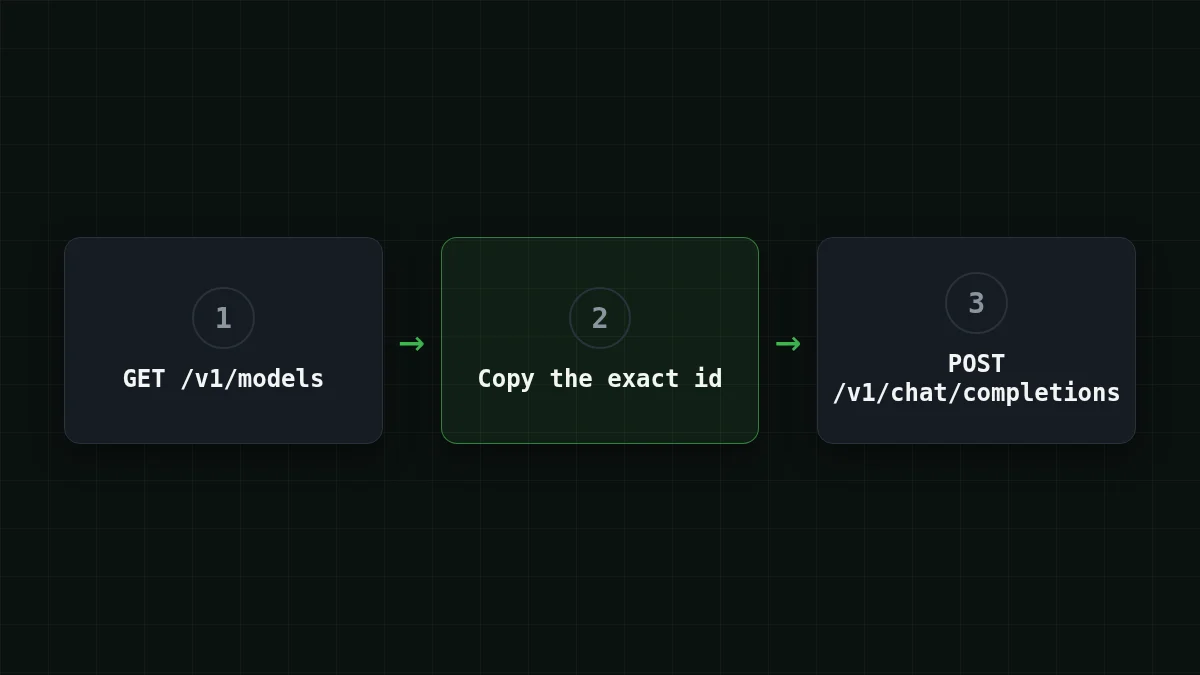
To lock in the routine, put the steps in order:
Put in order
Put the steps in order
Drag the items or use the arrows
- Call GET /v1/models
- Copy the exact model id
- Check the output limit and set max_tokens under it
- Send the chat request
If the request still fails#
Start with the string. A model id that differs by one character is the usual cause of a 404, so paste it again from the list instead of retyping it. A 402 means the balance is exhausted, and the rate limit is 120 requests per minute per API key. Errors come back in the standard OpenAI/Anthropic JSON shape, so SDKs parse them as usual. For the full walk-through, see API 401 or 404 error.
The API is OpenAI- and Anthropic-compatible at https:/; Anthropic SDKs and Claude Code use the root URL https:/ without /v1. More setup details live in the docs.


