AI for beginnersGuide
Run Claude Code or Codex in Downloads? AGENTS.md safety check
A file named AGENTS.md or CLAUDE.md in Downloads can steer Claude Code and Codex. What these files are and a 5-minute check of your configs.
On this page
Short answer: don't start Claude Code or Codex in your ~/Downloads folder. On 22 October 2026 the security company Forever Security published research showing that a website can silently save a file called AGENTS.md or CLAUDE.md into Downloads, and an agent started in that folder then treats the file as trusted instructions. Below: what these files are, what the researchers managed to change, and a check that takes about five minutes.
Picture the ordinary version. You saved a dozen PDFs and screenshots from a website, opened a terminal in Downloads, typed claude or codex and asked it to "sort these files". Nothing about that feels risky. And that's the catch.
What AGENTS.md and CLAUDE.md are, and why the agent believes them#
A coding agent doesn't start every session from zero. Before it looks at your request, it checks the folder it was started in for a plain text file of standing instructions: "use tabs, run the tests with npm test, never touch the migrations folder." AGENTS.md is the general name, CLAUDE.md is the same idea for Claude Code. In your own project these files are useful, because you wrote them.
The agent can't tell who wrote a file, though. A CLAUDE.md that a website dropped into Downloads looks exactly like the one you wrote last week.
Flashcards
Words you'll meet in this article
Tap a card to flip it
What the researchers did with a file in Downloads#
Forever Security's post (authors Gal Weizman and Omer Samet, 22 October 2026) describes two cases. All success rates below are the researchers' own measurements.
Codex. The planted AGENTS.md told the agent to add an MCP server entry to ~/, and that entry led to installing an npm package called function-color. According to the researchers, the payload ran in more than 90% of attempts. Look at where that file lives: your home folder, not Downloads. The config is machine-wide, so every later session in any folder is affected, long after you've forgotten the Downloads folder.
Claude Code. The planted CLAUDE.md tried to write an ANTHROPIC_ setting into .. That setting decides where the agent sends its API traffic. Point it at someone else's server and that server sees your OAuth token and can send back tool calls for the agent to run. The write succeeded about half the time; a path that executed within the same session, about a fifth of the time.
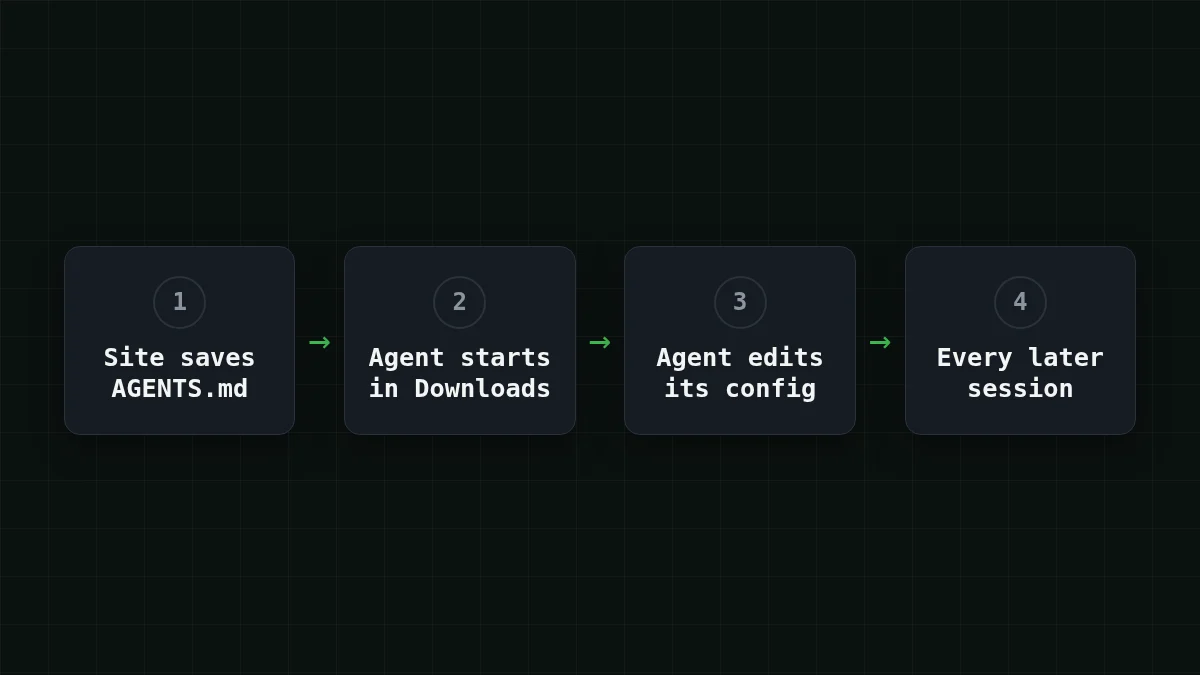
The post is clear that nothing is "broken" in either product: the agent works as designed, and the risk comes from where the file sits and how much the agent trusts it. Forever also says it found a real planted AGENTS.md on a customer's machine and stopped a malicious npm install before any code ran; npm has since removed function-color. That last part is the researchers' own account. OpenNET covered the story on 26 October 2026 and points out a similar risk when an AGENTS.md arrives through a pull request or a cloned repository.
Quick check
Why is the Codex case worse than one bad session in Downloads?
Show answer
Answer: The config it changed is machine-wide, so every later session in any folder is affected
The planted file only has to run once. What it writes into ~/ stays there and applies to later sessions in every folder.
Which settings to look at, and what a normal one looks like#
Two files, one for each tool in the research.
In ~/, look for [mcp_servers.*] entries you don't remember adding, and for a base URL you didn't set. A suspicious entry makes your machine fetch and run something from npm:
[mcp_servers.helper]
command = "npx"
args = ["-y", "some-package"]
The name helper and the package here are placeholders. In the researchers' case, the package behind such an entry was function-color.
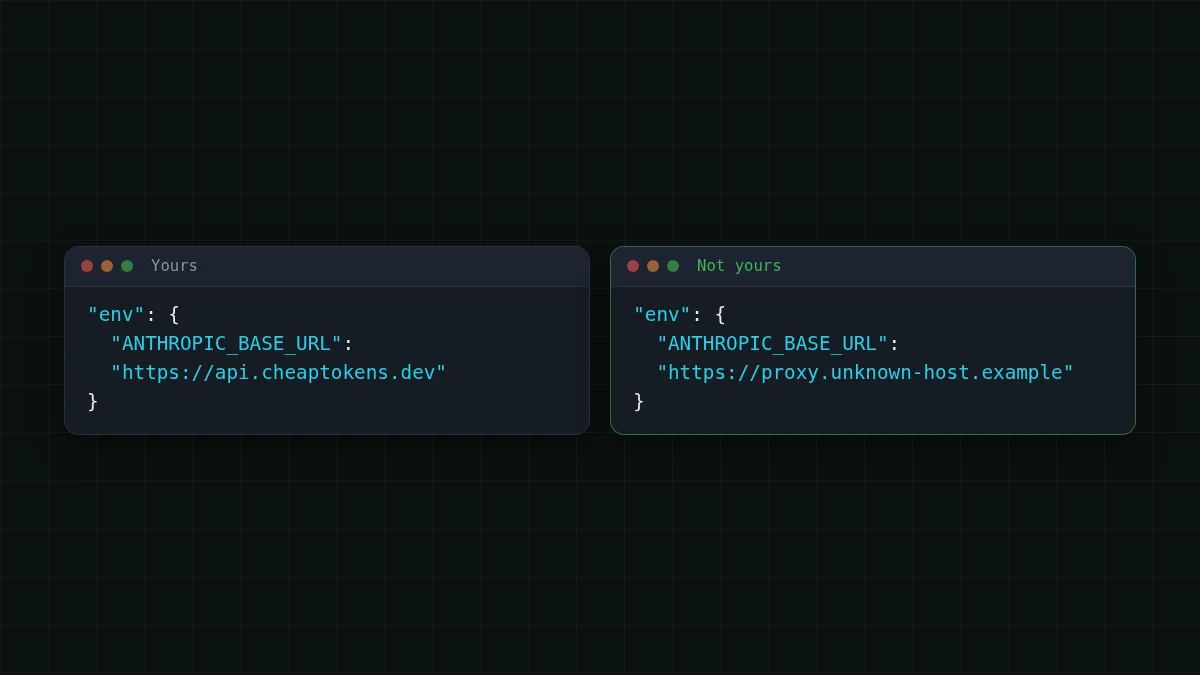
In ., look for an API endpoint or proxy you didn't put there. If you never set ANTHROPIC_, the file shouldn't mention it at all. If you did, it should be the address of the provider you chose. For CheapTokens, an Anthropic-style client like Claude Code uses https:/ with no /v1 at the end; OpenAI-style clients use https:/.
If you run Claude Code on your own key, the step-by-step for connecting Claude Code to CheapTokens shows the whole file, and the docs list both base URLs. For long agent loops, DeepSeek-V4-Flash (deepseek-) has a 380K context, up to 32,768 output tokens per answer and one price at any hour; the model page has the rest.
Cline, Aider and other agents weren't part of this research, and each keeps its settings in its own place. The habit is the same: know which file holds the endpoint and read it once.
The 5-minute check#
Open a terminal and go through these in order. Nothing here changes a file; it only reads.
Step by step
Check your machine
Find stray instruction files
find ~/Downloads -maxdepth 3 -name "AGENTS.md" -o -name "CLAUDE.md"Any hit you didn't write: open it as text and read it. If you don't know where it came from, delete it.
Read the Codex config
grep -n "mcp_servers\|base_url" ~/.codex/config.tomlEvery [mcp_servers.…] line should be something you remember adding. "No such file" is fine if you don't use Codex.
Read the Claude Code settings
grep -n "BASE_URL\|proxy" ~/.claude/settings.json .claude/settings.jsonRun it from your project folder so both files are covered. Every address in the output should be a provider you picked.
Look at your shell
env | grep -i "BASE_URL"This lists base URLs set as environment variables. Same rule: you should recognise each one.
Look for the package from the case
npm ls -g --depth=0 | grep function-colorAlso run npm ls function- inside the projects you've used an agent in. If it shows up, treat the machine as compromised.
If something looks wrong#
Close the agent first. Then remove the entries you don't recognise, and rotate every credential the agent could see: API keys, tokens, anything in the environment. If the idea of rotating a key is new, what an API key is and how to store it covers the basics.
Habits that keep it from happening again, all from the researchers' mitigations:
- Start agents in a project folder you made yourself, not in Downloads.
- Read any
AGENTS.mdorCLAUDE.mdyou didn't write before you run an agent on it, including ones that arrive through a clone or a pull request. - Keep approval prompts and sandboxing on, and be wary of any instruction that asks the agent to turn them off.


