AI for beginnersGuide
How an AI agent works: the loop, run with no API key
An AI agent is a loop: the model asks for a tool, your code runs it, the result goes back. Run a key-free Python demo, then point it at a real model.
On this page
You ask a coding agent to fix one typo and watch the log scroll: read a file, search, read another file, edit, run the tests. One small request, a dozen model calls. Where do they come from?
An AI agent is a loop. Your program sends the conversation to the model; the model either answers or asks for a tool ("read this file"); your program runs the tool, adds the result to the conversation and calls the model again. It repeats until the model answers in plain text. Coding agents such as Claude Code, Codex and Cursor's agent mode are built around this same loop, with more tools and more care. Below you will run a 40-line version with no key at all, then point it at a real model.
The loop in one picture#
Think of a manager who cannot touch anything. The manager only writes notes: "please bring me todo.txt". An assistant (your program) goes to the shelf, brings the file and puts it on the desk. The manager reads it and writes the next note, or the final answer.
That is the whole trick. The model never opens a file or runs a command. It writes text that says which tool to call and with which arguments. Your code does the work and reports back. If you have seen function calling, this is the same mechanism, repeated until the job is done.
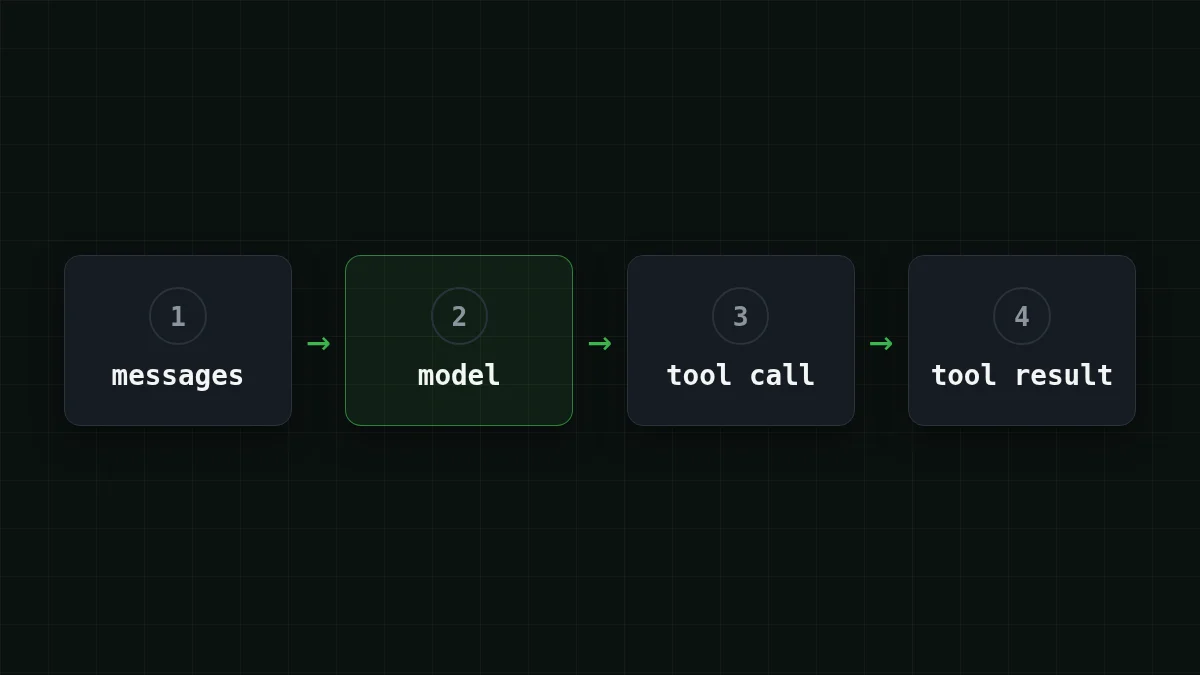
Can you put one lap of the loop in the right order?
Put in order
Put one lap of the agent loop in order
Drag the items or use the arrows
- Send the task and the tool list to the model
- The model answers with a tool call, not text
- Your program runs that tool itself
- The result goes into messages as a "tool" message
- The model is called again with the result, until it replies in plain text
Run it with no key#
Say the task is: "How many items are in todo.txt?". The tool is a function read_file that looks in a small dictionary instead of a disk. And instead of a real model there is a scripted one that always does the same two things: ask for the file, then answer. That is enough to see every moving part. Save this as agent_loop.py (Python 3.10+, standard library only):
import json, os, urllib.request

NOTES = {"todo.txt": "buy milk\ncall Anna\nsend invoice"}

def read_file(name):
    return NOTES.get(name, "no such file")

TOOLS = {"read_file": read_file}
TOOL_SPECS = [{"type": "function", "function": {
    "name": "read_file", "description": "Read a note by file name",
    "parameters": {"type": "object",
                   "properties": {"name": {"type": "string"}},
                   "required": ["name"]}}}]

def scripted_model(messages):
    if messages[-1]["role"] == "user":      # first lap: ask for the file
        return {"role": "assistant", "content": None, "tool_calls": [{
            "id": "call_1", "type": "function",
            "function": {"name": "read_file",
                         "arguments": "{\"name\": \"todo.txt\"}"}}]}
    return {"role": "assistant", "content": "The file has 3 items."}

def real_model(messages):
    body = {"model": os.environ["LLM_MODEL"], "messages": messages,
            "tools": TOOL_SPECS}
    req = urllib.request.Request(
        os.environ["LLM_BASE_URL"] + "/chat/completions",
        data=json.dumps(body).encode(),
        headers={"Content-Type": "application/json",
                 "User-Agent": "agent-loop-demo/1.0",
                 "Authorization": "Bearer " + os.environ["LLM_API_KEY"]})
    with urllib.request.urlopen(req) as resp:
        data = json.load(resp)
    u = data["usage"]
    print("  usage: in", u["prompt_tokens"], "out", u["completion_tokens"])
    return data["choices"][0]["message"]

def run(task, model, max_steps=8):
    messages = [{"role": "user", "content": task}]
    for step in range(1, max_steps + 1):
        reply = model(messages)
        messages.append(reply)              # keep the model's turn in history
        calls = reply.get("tool_calls")
        if not calls:
            print(f"step {step}: answer -> {reply['content']}")
            return
        for call in calls:
            name = call["function"]["name"]
            args = json.loads(call["function"]["arguments"])
            result = TOOLS[name](**args)    # YOUR code does the work
            print(f"step {step}: tool {name}({args}) -> {result!r}")
            messages.append({"role": "tool", "tool_call_id": call["id"],
                             "content": result})
    print("stopped: max_steps reached")

model = real_model if os.environ.get("LLM_API_KEY") else scripted_model
run("How many items are in todo.txt?", model)
Run python agent_. With no LLM_API_KEY in your environment you get the scripted model, and the screen shows exactly two laps:
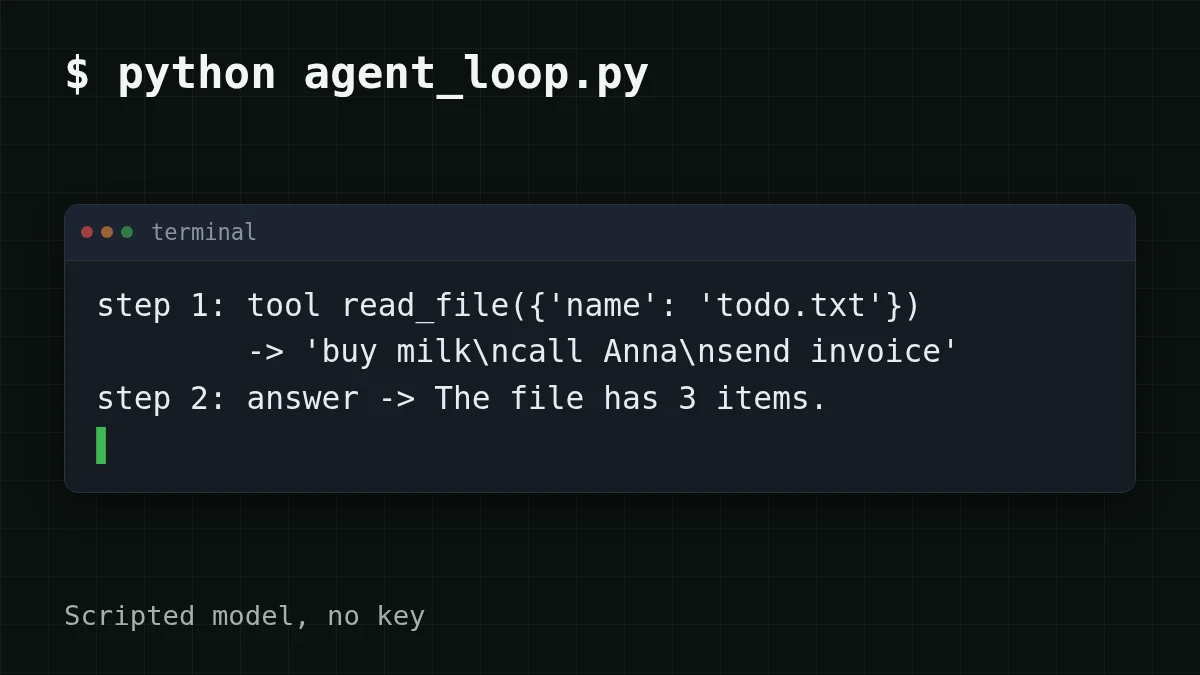
Look at three lines, because they hold the whole idea:
messages.keeps the model's own turn. Skip it, and the next call contains a tool result that answers a request the API has never seen; most APIs reject that with a 400.append(reply) argumentsarrives as a JSON string, so it goes throughjson.loadsbefore you call the function.max_stepsis the emergency brake. A model can keep asking for tools forever, so every real agent has a limit like this.
Point the same loop at a real model#
Only one thing changes: who plays the model. The script reads three environment variables, and if a key is present it sends the same messages to an OpenAI-compatible endpoint. The CheapTokens address is https:/ (OpenAI Chat Completions and Anthropic Messages compatible), and the model id has to be the full one from the docs: deepseek-.
Run the loop three ways
No key
python agent_loop.pyThe scripted model plays both laps. Nothing leaves your machine.
DeepSeek-V4-Flash
export LLM_BASE_URL=https://api.cheaptokens.dev/v1
export LLM_API_KEY=<your key>
export LLM_MODEL=deepseek-ai/DeepSeek-V4-Flash-0731
python agent_loop.py
A 380K context window and up to 32,768 output tokens per answer: room for a long loop.
GLM-5.3-Flash
export LLM_BASE_URL=https://api.cheaptokens.dev/v1
export LLM_API_KEY=<your key>
export LLM_MODEL=zai-org/GLM-5.3-Flash
python agent_loop.py
A light model with a 390K context window for a first run of a multi-step loop.
What you should see is the same shape as before: step 1: tool read_, then step 2: answer -, with a usage: line under each model call. The wording of the answer will differ from the scripted one, and a chatty model may take an extra lap. That is normal: the model decides, the loop just obeys. Keep the key out of the script itself; an environment variable is the safe place (here is how to store it).
The usage: lines are the useful part. Add the in numbers of a longer run and you will see where the money goes.
Why every lap costs more than the last#
The model remembers nothing between calls. Each lap sends the whole messages list again: the task, every earlier tool call, every tool result. (The same rule makes a long chat expensive; multi-turn chat shows it on a plain conversation.)
Lap 1 sends one message. If the loop keeps going, lap 6 sends eleven.
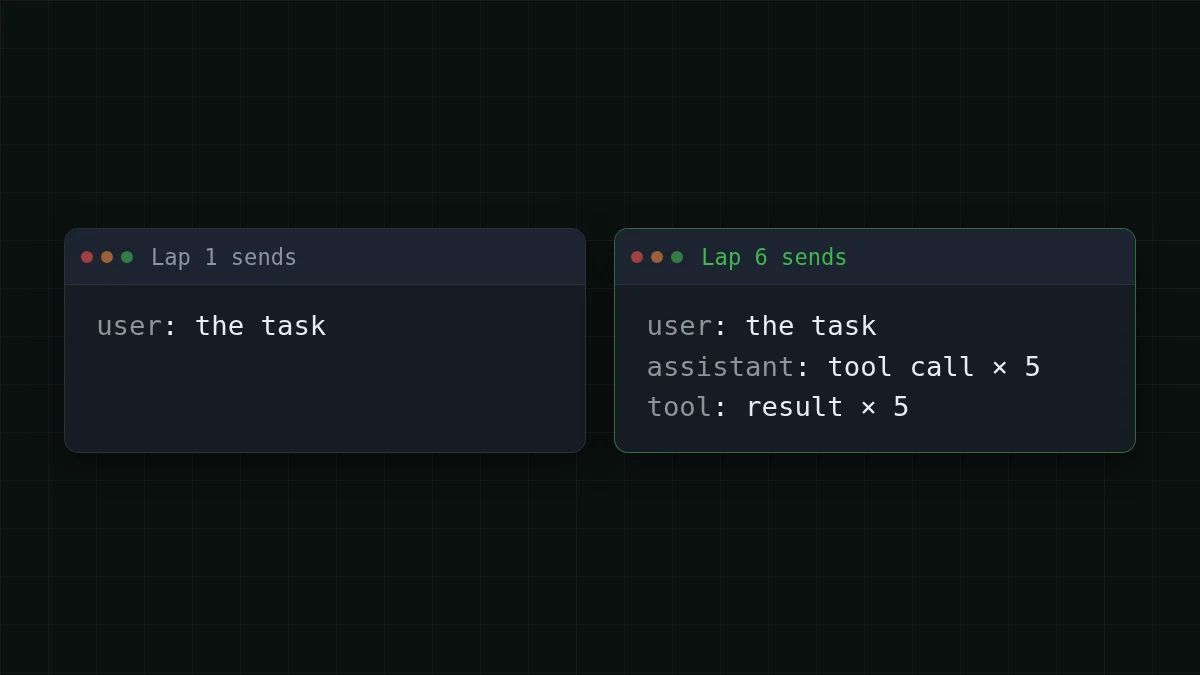
Say a real task takes 10 laps. It starts with about 2,000 tokens (instructions, tool list, your request), each lap adds about 1,500 (a tool result plus the model's note), and the model writes about 300 tokens per lap. Lap 1 sends 2,000, lap 2 sends 3,500, lap 10 sends 15,500. The sum of the first part is 10 × 2,000 = 20,000 tokens; the growth adds 1,500 × 45 = 67,500 (45 is 0+1+…+9), so the input over the task is 20,000 + 67,500 = 87,500 tokens. The output is 10 × 300 = 3,000 tokens.
The task text itself is a few sentences, yet the input side is 87,500 tokens. At $0.015 per 1M input tokens, the whole task on DeepSeek-V4-Flash comes to $0.0016. Here is the same load across the models, with OpenRouter for reference. In total, with input and output counted together, CheapTokens comes out cheaper than OpenRouter on this load:
| Model | Input $/1M | Output $/1M | Cost | OpenRouter |
|---|---|---|---|---|
| GLM-5.3-Flash | $0.02 | $0.04 | $0.0019 | $0.0038 |
| DeepSeek-V4-Flash | $0.015 | $0.10 | $0.0016 | $0.0046 |
| MiniMax-M2.7 | $0.05 | $0.15 | $0.0048 | $0.0299 |
87,500 input and 3,000 output tokens in total. Prices per 1M tokens are current and change together with our tariffs; the OpenRouter column shows reference prices for the same workload.
One price at any time of day also helps here: an agent that runs overnight costs the same as one at noon, and you can see all prices on the pricing page. For a day of such tasks, move the sliders:
Cost calculator
One day: 20 tasks of 10 laps each
Input tokens per request: 8,750 · Output tokens per request: 300 · Requests per day: 200
| Model | Per day | Per month |
|---|---|---|
| GLM-5.3-Flash$0.02$0.04 | $0.0374 | $1.12 |
| DeepSeek-V4-Flash$0.015$0.10 | $0.0323 | $0.968 |
| MiniMax-M2.7$0.05$0.15 | $0.0965 | $2.90 |
The fields are per model call: 8,750 is the average input of a lap from the example above (87,500 ÷ 10), and 200 calls is 20 tasks × 10 laps. This is why agent bills are about the history, not the question. The 20-step example goes deeper into the same effect.
Quick check
Lap 3 of an agent loop costs more than lap 1, though you asked nothing new. Why?
Show answer
Answer: The messages list now holds two tool calls and two results, and all of it is sent again
The API is stateless. Every call carries the full history, so input tokens grow with each lap while the output stays about the same.
Where to go from 40 lines#
The script above is a sketch for learning. If you want the long version, there is an open course on GitHub, justxor/agent-harness-course (README in Russian, checked on 31 October 2026). It is plain Python 3.10+ with no dependencies, the code is MIT-licensed, the text is CC BY 4.0. After cloning, python examples/ runs the loop offline with a scripted model, and python - runs its 19 tests without network. The course continues with context compaction, memory, subagents, human approval of risky actions, and cost tracking. For a real model it reads LLM_PROVIDER, LLM_MODEL, LLM_API_KEY and, for OpenAI-compatible endpoints, LLM_BASE_URL: take the exact LLM_PROVIDER value from its README.
When the loop works, the next step is a real key and a real task: the docs have a first request in a minute, and DeepSeek-V4-Flash is a good model to run the loop on.


