Getting startedGuide
Multi-turn chat with an API: resend the messages array
The model remembers nothing between requests. Build a Python chat loop that resends the messages array and see how input tokens grow.
On this page
Your second question gets a strange answer because the API never saw your first one. The model keeps nothing between requests, so a chat is something you build: after every reply you append it to a list called messages and send the whole list again. That's the entire trick, and below is a working Python loop for it against the CheapTokens OpenAI-compatible API.
Two official docs describe the same thing. Anthropic's Messages API reference (checked 30 October 2026) calls the API stateless and multi-turn: earlier turns travel in the messages parameter. OpenAI's text-generation guide (checked 30 October 2026) says to keep context by sending earlier turns as role-tagged messages and appending each reply before the next request.
Why the second question gets a blank stare#
Say you type What is a token?, read the answer, and then type Explain it shorter. To you, "it" is obvious. To the API, request number two is a stranger's one-line message: there is no "it", nothing to shorten. You'll get a guess or a question back, not a shorter explanation.
The fix is to make request two carry everything request one had, plus the reply, plus the new question. Compare the two payloads:
Compare
Request 2, with and without history
Without history
messages = [
    {"role": "user", "content": "Explain it shorter"},
]
The model has no idea what "it" is.
With history
messages = [
    {"role": "user", "content": "What is a token?"},
    {"role": "assistant", "content": "<the first answer>"},
    {"role": "user", "content": "Explain it shorter"},
]
Now "it" points at the first answer.
Three roles do all the work. system sets the rules once (tone, length, what the bot is for). user is what the person typed. assistant is what the model said earlier. The model reads the list top to bottom and writes the next assistant message.
The chat loop in a few lines#
Install the SDK with pip install openai and keep your key in an environment variable, as in how to store an API key safely. The base URL and model id come from the CheapTokens docs and GET /v1/models (more in listing models to find the exact id). For a learning loop, GLM-5.3-Flash is a good fit: 390K context and up to 8,192 output tokens per answer.
import os
from openai import OpenAI

client = OpenAI(
    base_url="https://api.cheaptokens.dev/v1",
    api_key=os.environ["CHEAPTOKENS_API_KEY"],
)
MODEL = "zai-org/GLM-5.3-Flash"

messages = [
    {"role": "system", "content": "You are a patient tutor. Keep answers under 80 words."},
]

while True:
    question = input("you> ").strip()
    if question in ("", "exit"):
        break
    messages.append({"role": "user", "content": question})

    response = client.chat.completions.create(
        model=MODEL,
        messages=messages,
        max_tokens=400,
    )
    answer = response.choices[0].message.content
    messages.append({"role": "assistant", "content": answer})

    print(answer)
    print(f"[input tokens this turn: {response.usage.prompt_tokens}]")
Run it, ask What is a token?, then Explain it shorter. The second answer now refers to the first one. The last line prints usage., the input side of the bill for that turn; watch it climb with every question.
The order inside the loop matters, and it's the part beginners get wrong most often:
Put in order
Put one turn of the loop in order
Drag the items or use the arrows
- Append the user's question to messages
- Send the whole messages list
- Read the reply from the response
- Append the reply as an assistant message
Skip step 4 and the model forgets its own answers, so "explain it shorter" works once and then breaks again on the third question.
What the list looks like after two turns#
After What is a token? and Explain it shorter, the list your code holds has five entries: the system rule, the first question, the first answer, the second question, the second answer. The next request will send all five plus the third question.
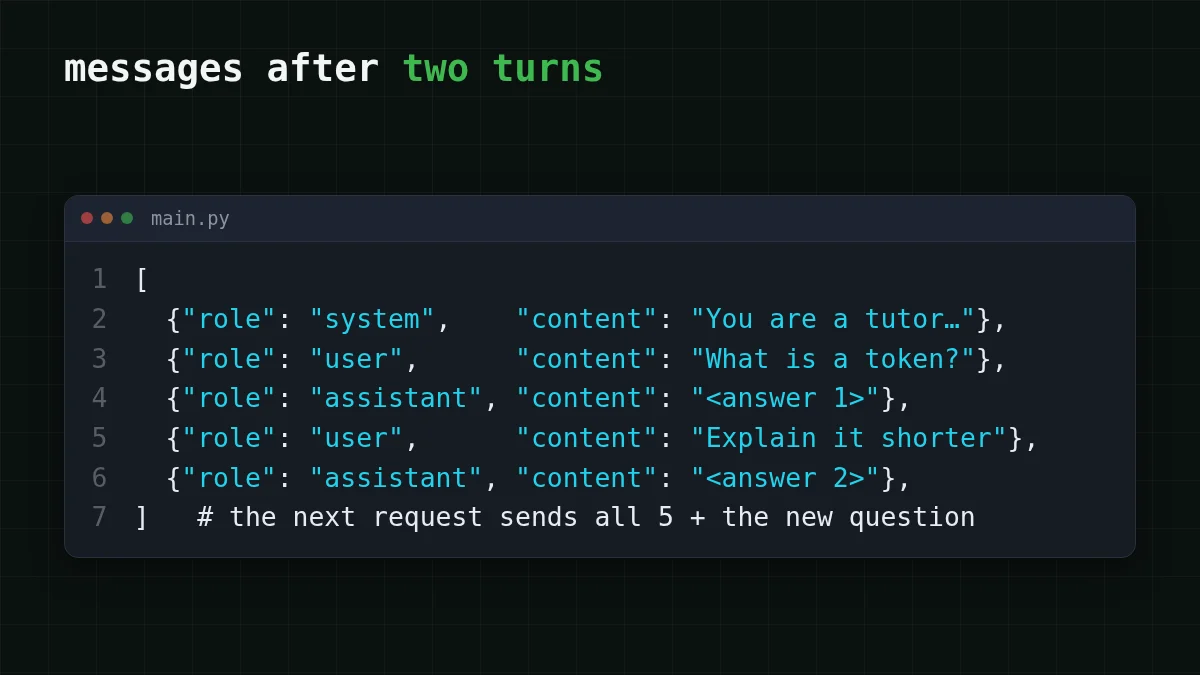
The system message is sent every time. The API doesn't "keep" it on its side; it's just the first item of the list. OpenAI's guide (checked 30 October 2026) notes that instructions apply only to the current request, which is the same idea from the other direction. If you want to tune that first message, see system prompt and temperature explained.
What happens to input tokens as the chat grows#
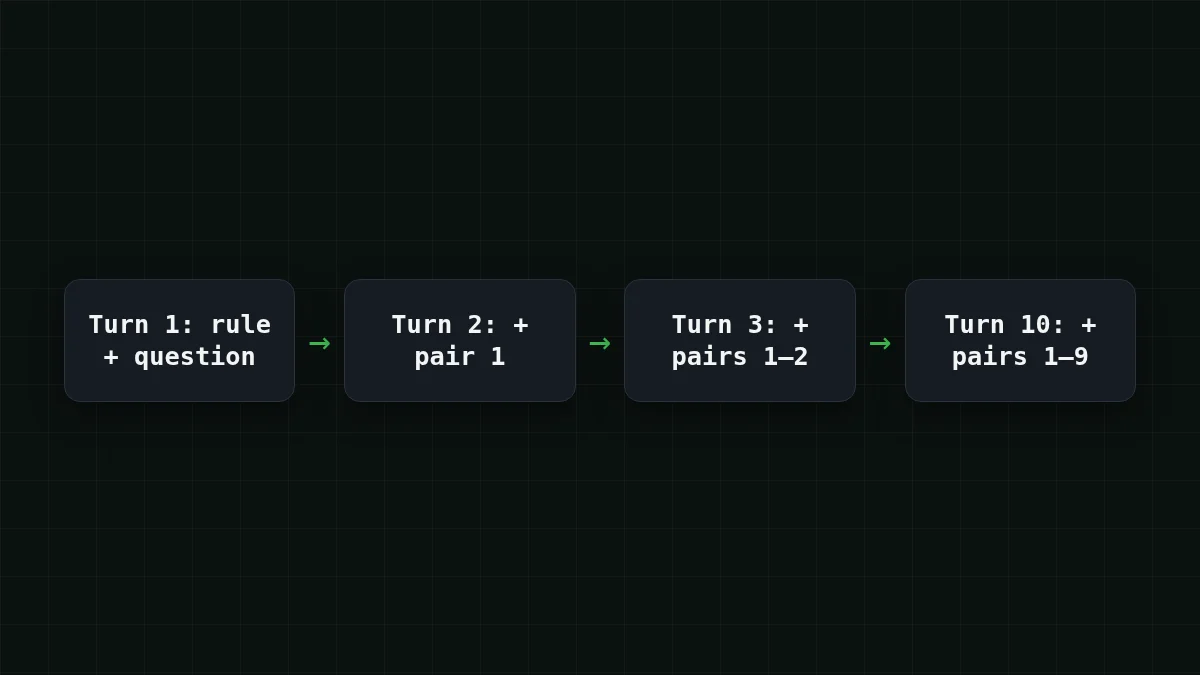
Every request pays for the whole list again as input. Turn 1 sends the system rule and one question; turn 10 sends the rule, nine earlier question-and-answer pairs and the new question. So input grows with every turn, even if each of your messages is short.
Say a 10-turn chat with these assumptions: the system rule is about 50 tokens, each question about 150, each reply about 250. Turn 1 sends 50 + 150 = 200 input tokens. Each later turn adds one more 400-token pair (150 + 250 = 400), so the total input over ten turns is 200 × 10 + 400 × 45 = 20,000 tokens, where 45 is 0 + 1 + … + 9. The output is 250 × 10 = 2,500 tokens. Ten messages from you, and the input is eight times the output.
Here is that whole chat priced on live rates, 20,000 tokens in and 2,500 out:
| Model | Input $/1M | Output $/1M | Cost | OpenRouter |
|---|---|---|---|---|
| GLM-5.3-Flash | $0.02 | $0.04 | $0.0005 | $0.001 |
| DeepSeek-V4-Flash | $0.015 | $0.10 | $0.00055 | $0.0013 |
| MiniMax-M2.7 | $0.05 | $0.15 | $0.0014 | $0.009 |
20,000 input and 2,500 output tokens in total. Prices per 1M tokens are current and change together with our tariffs; the OpenRouter column shows reference prices for the same workload.
In the total, with input and output counted together, GLM-5.3-Flash and DeepSeek-V4-Flash cost less here than at OpenRouter, and both keep one price at any hour. If you want answers longer than 8,192 tokens in the same chat loop, DeepSeek-V4-Flash allows up to 32,768 output tokens per answer with a 380K context; swap the model id for deepseek- and nothing else in the loop changes.
The deeper cost story is in why a long AI chat costs more; input vs output tokens explains why the two sides are priced separately.
Quick check
Your chat is on turn 8. What does the request for turn 8 contain?
Show answer
Answer: The system message and every earlier question and answer, plus the newest question
The API remembers nothing, so the full list goes out each time. That's also why input tokens climb turn after turn.
Keeping a long chat under control#
The list can't grow forever: it has to fit in the model's context window (see what a context window is), and every extra turn costs input. Two habits keep it sane for a prototype:
- Trim the oldest turns. Keep the system message and the last few pairs, for example
messages = messages[:1] + messages[-before each request. Drop pairs together so a question never loses its answer.8:] - Start a fresh list for a new topic. A new task doesn't need the history of the old one.
A support bot with a long-lived rule set is the same loop: the system message sets the rules once, each user turn and reply is appended, and you trim when the list gets heavy. For the first request itself, see your first API request with CheapTokens; the model list and prices are on the pricing page.


