AI for beginnersGuide
What is a context window in AI? What fills it and what to do
The context window is a model's working memory for one request: your prompt, the chat history and the answer. See what fills it, how to estimate it, and three habits.
On this page
Your chat ran fine for twenty messages, and now the answers get vague. One thing that grows with every message is the context window: the model's working memory for one request. It holds everything you send plus the answer the model writes, and it has a fixed size, for example 380K tokens for DeepSeek-V4-Flash.
What the context window is#
Think of a desk. The model can only work with what is on the desk right now: your instructions, the conversation so far, a pasted document and the answer it is writing. Anything that is not on the desk does not exist for it. Anthropic's documentation on context windows (checked 27 October 2026) puts it the same way: the window is all the text a model can reference when it generates a response, including the response itself, and it is separate from the data the model was trained on.
The desk has a fixed size, counted in tokens. A token is a piece of text, roughly ¾ of an English word; what is a token in AI goes deeper. Here are the three models on CheapTokens and their windows:
- GLM-5.3-Flash: 390K tokens
- DeepSeek-V4-Flash: 380K tokens
- MiniMax-M2.7: 180K tokens
K means thousand. A 380K window is about 285,000 English words: 380,000 × 0.75 = 285,000. That is a few novels on one desk, and it still runs out faster than you would think.
What counts toward it#
Everything in the request counts, not just your last message:
- the system prompt (the standing instructions);
- every earlier message, yours and the model's;
- tool definitions and tool results, if you use an agent or an editor plugin;
- documents and images you attach;
- the answer itself, including any thinking the model does.
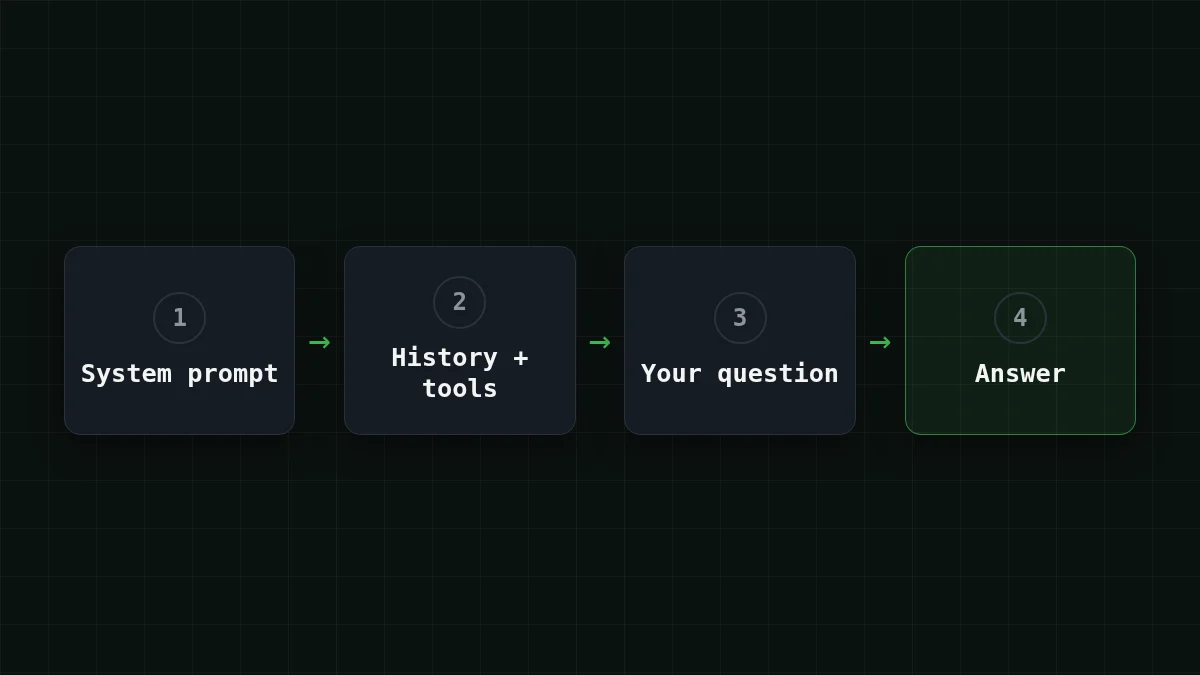
An editor agent is the sneaky case. At every step it sends the tool list again plus everything it has read so far. You typed one sentence; the window sees far more.
You do not have to guess the size. Each response carries a usage field with the token counts. This minimal chat loop (OpenAI-compatible API, model id from the CheapTokens docs) shows both things at once: the whole history goes out on every turn, and the counts come back.
import os
from openai import OpenAI

client = OpenAI(
    base_url="https://api.cheaptokens.dev/v1",
    api_key=os.environ["CHEAPTOKENS_API_KEY"],
)

history = [{"role": "system", "content": "You are a helpful assistant."}]

def ask(text):
    history.append({"role": "user", "content": text})
    resp = client.chat.completions.create(
        model="deepseek-ai/DeepSeek-V4-Flash-0731",
        messages=history,  # the whole conversation goes out every time
        max_tokens=1000,
    )
    answer = resp.choices[0].message.content
    history.append({"role": "assistant", "content": answer})
    print(resp.usage.prompt_tokens, "in /", resp.usage.completion_tokens, "out")
    return answer
Call ask() ten times and watch the first number climb. That climb is the whole story of this article.
Window vs. max output: two different numbers#
Every model page lists two sizes, and beginners often mix them up. The window is the whole desk, input and output together. The output limit is how long one answer may be: up to 32,768 tokens for DeepSeek-V4-Flash, up to 8,192 for GLM-5.3-Flash and MiniMax-M2.7.
They share the same space. Whatever your input takes, the answer has to fit in what is left. If you want to see what a cut-off answer looks like, why an AI answer stops mid-sentence walks through it.
Quick check
DeepSeek-V4-Flash has a 380K window and a 32,768-token output limit. You send 375K tokens of input. About how long can the answer be?
Show answer
Answer: About 5K tokens, whatever is left in the window
The window covers input and output together: 380K − 375K leaves about 5K, which is below the 32,768 cap.
Why a long chat fills the window (and the bill)#
A model does not remember your last message. To keep a conversation going, the API receives the whole history again each turn: previous turns are kept completely, and the model's answer becomes part of the next input. (Chat apps sometimes drop the oldest messages quietly; the API does not do that for you.)
Say you chat with a support assistant for 30 turns. Assume a 400-token system prompt, 150 tokens per question and 450 per answer, so each exchange adds 600 tokens to the history.
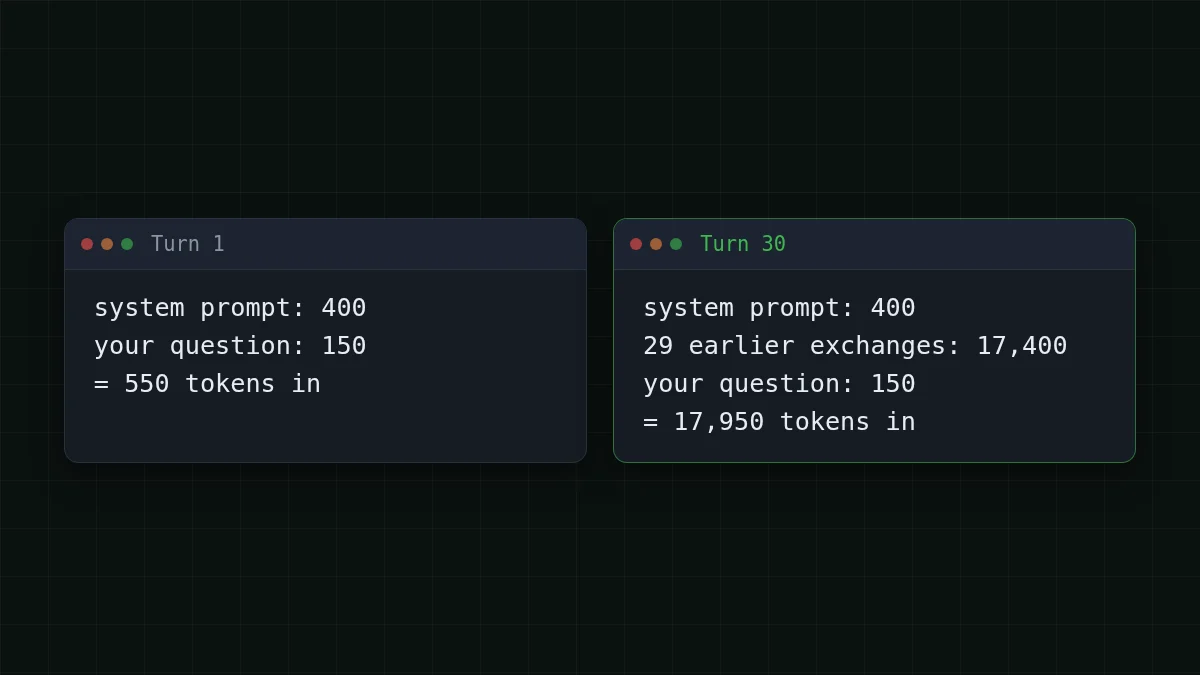
Turn 1 sends about 550 tokens. Turn 30 sends 400 + 150 + 29 × 600 = 17,950. Added up over the whole chat, every turn carries the 550 tokens of its own start, so 30 × 550 = 16,500. On top of that, turn n re-sends n − 1 earlier exchanges of 600 tokens each: 600 × 435 = 261,000, where 435 = 1 + 2 + … + 29. The input of the whole chat is 16,500 + 261,000 = 277,500 tokens, and the answers add 30 × 450 = 13,500.
On DeepSeek-V4-Flash that whole chat costs $0.0055. Here are all three models, with the OpenRouter reference price next to them; counting input and output together, each is cheaper than OpenRouter for this chat:
| Model | Input $/1M | Output $/1M | Cost | OpenRouter |
|---|---|---|---|---|
| GLM-5.3-Flash | $0.02 | $0.04 | $0.0061 | $0.0125 |
| DeepSeek-V4-Flash | $0.015 | $0.10 | $0.0055 | $0.0153 |
| MiniMax-M2.7 | $0.05 | $0.15 | $0.0159 | $0.0995 |
277,500 input and 13,500 output tokens in total. Prices per 1M tokens are current and change together with our tariffs; the OpenRouter column shows reference prices for the same workload.
Averaged, that chat is 277,500 ÷ 30 = 9,250 tokens in per request and 450 out.
Want your own chat? Change the numbers below, for example to 100 turns, and watch how fast the total grows.
Cost calculator
The same 30-turn chat, averaged
Input tokens per request: 9,250 · Output tokens per request: 450 · Requests per day: 30
| Model | Per day | Per month |
|---|---|---|
| GLM-5.3-Flash$0.02$0.04 | $0.0061 | $0.183 |
| DeepSeek-V4-Flash$0.015$0.10 | $0.0055 | $0.165 |
| MiniMax-M2.7$0.05$0.15 | $0.0159 | $0.477 |
Now the honest part. 17,950 tokens is under 5% of a 380K window, so a plain chat rarely hits the wall. What grows is the bill and the noise. Anthropic's documentation notes that accuracy and recall degrade as the token count grows (it calls this context rot), so a bigger window is not automatically better: what you put in matters as much as how much fits. Where the wall does appear is documents and agents. On Anthropic's own API, a request whose input alone is larger than the window gets a 400 error, prompt is too long. For the cost side of the same effect, see why a long AI chat costs more.
Will my document fit?#
A rough rule for English text: one token is about ¾ of a word, so tokens ≈ words ÷ 0.75. Other languages usually take more tokens per word, so leave extra margin. Try it before reading on.
Guess the number
How many tokens is a 90,000-word book?
Your guess
0300,000
Show answer
Answer: 120,000
About 120,000: 90,000 ÷ 0.75 = 120,000. It fits in any of the three windows with room to spare.
Now a bigger case. Say you have a 150,000-word archive of support emails and want a summary: 150,000 ÷ 0.75 = 200,000 tokens. 200,000 tokens is more than a 180K window, so for this archive pick GLM-5.3-Flash (390K) or DeepSeek-V4-Flash (380K). DeepSeek-V4-Flash still leaves 380,000 − 200,000 = 180,000 tokens of room on DeepSeek-V4-Flash, more than enough for a summary under its 32,768-token answer limit. Reading those 200,000 tokens and writing a 2,000-token summary costs $0.0032.
A smaller case: a 60,000-word report is 60,000 ÷ 0.75 = 80,000 tokens. MiniMax-M2.7 handles it with 100K to spare, which makes its 180K window enough for chats and mid-size documents.
Three habits for a nearly full window#
1. Summarize and restart. On turn 30 the request carries 17,950 tokens. Ask the model to write a 200-token summary of the decisions so far, then start a fresh chat with it. The next request is 400 + 200 + 150 = 750 tokens in, and the model still knows what matters.
2. Send only the part you need. Paste the chapter you are asking about, not the whole book; the function, not the whole repository. Less on the desk means a smaller bill, and, going by Anthropic's context-rot note, a model that has less to get lost in.
3. Keep the fixed parts lean and watch usage. The system prompt, tool definitions and long tool results ride along on every step. Trim what you do not use, print the token counts after each response as in the loop above, and set max_tokens to the length you actually need.
When you want to try this on a real model, the CheapTokens docs show the first request in a few lines, and the pricing page lists the live price of each model. For long documents and agent loops, DeepSeek-V4-Flash (380K context, up to 32,768 output tokens, one fixed price with no peak hours) and GLM-5.3-Flash (390K, the largest window of the three) are the ones to look at first.


