AI for beginnersBreakdown
Build a site by talking to an AI agent: the HackerTube example
How Karpathy's HackerTube split into four stages, which three steps the agent can't do for you, and how to estimate the cost of the bulk-filter stage.
On this page
An AI agent can build the whole site for you except three things: the API key, the server and the domain. That is the split in HackerTube, a YouTube-style site that Andrej Karpathy says he made in about two hours by only talking to Claude. Below: the four stages the project went through, what you have to prepare yourself, and how to estimate what the repetitive middle stage would cost on your own data.
Four stages, in this order#
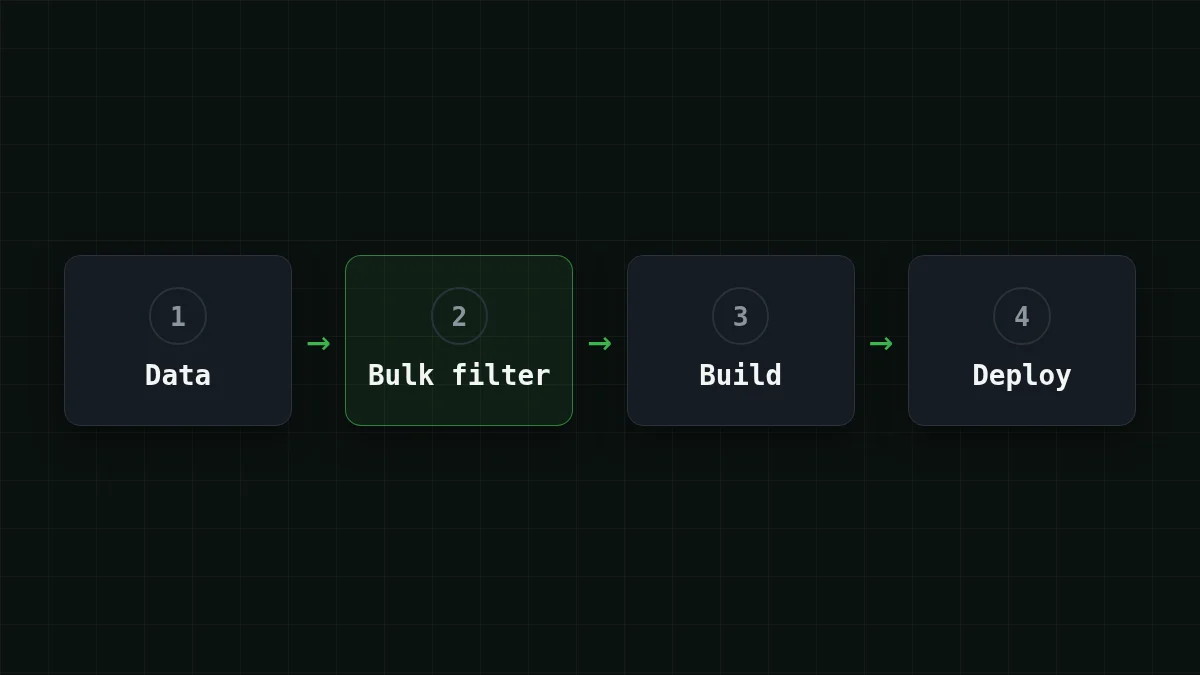
Karpathy (AI researcher, OpenAI co-founder, former Tesla AI director, founder of Eureka Labs) published the write-up on 31 October 2026: HackerTube on his blog. The site collects the Hacker News comments that recommend a YouTube video and lets you browse them. Behind it sits a skeleton that almost every 'just talk to the agent' project shares. Try to put it in order yourself:
Put in order
Put the stages of a data-to-website project in order
Drag the items or use the arrows
- Download the raw dataset
- Run a smaller model over every item: keep or drop
- Build the interface from what is left
- Put it on a server
Stage two is the odd one out. Download, build and deploy each happen once. The keep-or-drop question is asked once per item, tens of thousands of times. Hold that thought, it comes back when we get to money.
What the agent did, in numbers#
Here is the run as Karpathy describes it. He worked in the Claude Code desktop app. Opus 5.5 on medium effort, his default, downloaded the Hacker News comments dataset from Hugging Face and filtered it. Sonnet went over the comments inside a Claude Code Workflow. What came out: about 40K comments that recommend a YouTube video, 6,454 videos from 2007 to 2026, sorted into 150 topics. Then Opus built the interface and deployed it to a VPS. The site has 'ForYou' recommendations without accounts (the state lives in the browser session), keyboard shortcuts and a data export, so other people can hand the data to their own agent.
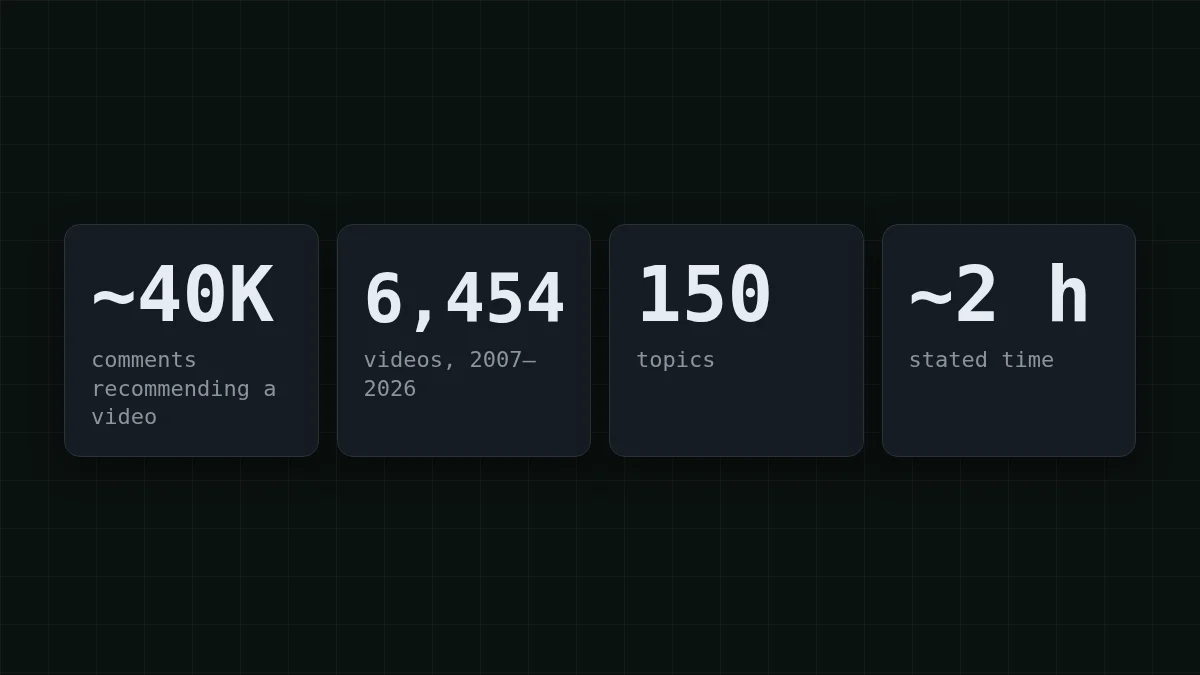
What the post does not give you: any cost or token count, and which steps were plain code versus model calls. So 'two hours' is a time, not a price. If you want to know why that distinction matters, do agents need the model at every step? covers it.
Three things that stay with you#
Karpathy did three steps by hand: he created a Google Cloud API key (for YouTube metadata), booted the VPS and bought the domain. Look at what they share. Each one is tied to an account of yours: a login, a billing profile, your identity. An agent can write every command, but it can't stand at the checkout as you. It's like hiring a builder: they'll put up the house, but you sign for the land.
Match the pairs
Match each step to why it stays with you
Tap an item on the left, then its pair
- Create the YouTube metadata API keyIt lives in your Google Cloud account
- Boot the serverIt is billed to your hosting account
- Buy the domainIt is registered in your name
- Write the filter script and the interfaceThe agent does this part
In practice the agent will stop and ask. Do the key yourself, put it in an environment variable, and give the agent only the variable's name, never the key itself. If keys are new to you, what an API key is and how to store it safely takes five minutes.
Try the same shape on your own data#
Say you have reviews.csv with 40,000 product reviews and you want a small searchable page with only the reviews about battery life. A prompt in the HackerTube spirit:
I have reviews.csv (40000 rows, column: text). Goal: a small searchable web page with only the reviews about battery life.

1. Look at the file and tell me what is in it. Change nothing yet.
2. Write a script that sends each review to a model and gets back keep or drop. Use an OpenAI-compatible API: base URL https://api.cheaptokens.dev/v1, key from the environment variable CHEAPTOKENS_API_KEY, model deepseek-ai/DeepSeek-V4-Flash-0731.
3. Run it on the first 100 reviews, show me the results and the tokens used. Wait for my OK before the full run.
4. Build the page from the kept reviews.
Whenever you need an account, a key or a payment from me, stop and tell me what to do.
Step 3 is the habit worth stealing. A hundred rows cost almost nothing, and you see the model's mistakes before it spends money on forty thousand. The last line is the handoff from the previous section, written down. The base URL and the model id come from the CheapTokens docs; you create the key there yourself.
What the bulk stage costs#
Back to the stage that repeats. Say each review plus a one-line instruction is about 150 tokens, and the answer ('keep' or 'drop') is about 10. For 40,000 reviews that is 40000 × 150 = 6000000 input tokens and 40000 × 10 = 400000 output tokens. On DeepSeek-V4-Flash the whole pass is $0.13, on GLM-5.3-Flash $0.136. With input and output counted together, both are cheaper than OpenRouter. Each request is tiny, so the 380K and 390K context windows never come into play; what matters is the per-token price times a very large number of calls.
Change the numbers to your own data and see:
Cost calculator
One bulk-filter pass: 40,000 items
Input tokens per request: 150 · Output tokens per request: 10 · Requests per day: 40,000
| Model | Per day | Per month |
|---|---|---|
| GLM-5.3-Flash$0.02$0.04 | $0.136 | $4.08 |
| DeepSeek-V4-Flash$0.015$0.10 | $0.13 | $3.90 |
| MiniMax-M2.7$0.05$0.15 | $0.36 | $10.80 |
That is one stage only. Building and deploying are separate sessions with the agent, and your real filter prompt will be longer than one line. Filter 40K comments with an LLM shows a full keep/drop prompt, and model routing explains how to send easy items to a cheap model first. Current prices for every model are on the pricing page.
Quick check
Which stage of a project like this runs the most times?
Show answer
Answer: Judging each item: keep or drop
The keep-or-drop call runs once per item, so 40,000 items mean 40,000 calls. That is why its per-call price is the number to check first.
Your first move: send those 100 rows through the first-request setup, read the answers, and only then let the agent run the rest.


