API & SDKGuide
First request in Rust with async-openai: base URL, key, usage
A small Rust program with tokio and async-openai that sends one chat completion to CheapTokens and prints the reply and token counts.
On this page
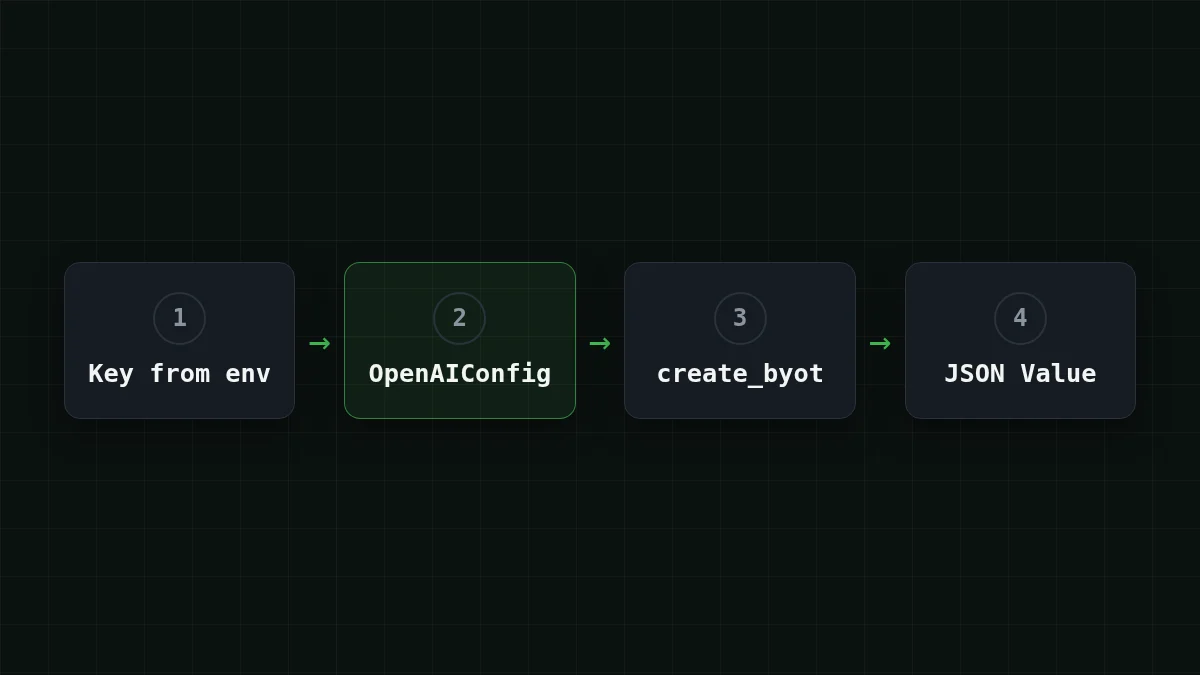
To call CheapTokens from Rust with async-openai, build an OpenAIConfig with the base URL https:/ and your key, then send the request with create_byot and a JSON body. The reply text and the token counts come out of the JSON that comes back. That's about 25 lines of code, and the same program works for any model on the CheapTokens models page once you change one string.
The crate's docs.rs page (checked 8 November 2026) lists version 0.43.0 under the MIT license, and that's the version this guide follows.
Why create_byot instead of typed requests#
async-openai normally gives you a typed request builder: you fill a struct, it gives you a struct back. That's comfortable until a gateway returns a field the structs don't know. The byot feature ("bring your own types") adds *_byot methods that take any JSON body and return any type you can deserialize into, including plain serde_.
For a first request that is exactly what you want. You write the same JSON you would put in a curl call, and you read usage straight from the response, with no type to look up.
Set up the project#
Step by step
Create the project and set the key
Add the crates
In a fresh project (cargo new cheaptokens-), add three dependencies. async-openai needs two features here: byot for the create_byot methods and chat-completion for the chat section.
cargo add async-openai --features byot,chat-completion
cargo add tokio --features macros,rt-multi-thread
cargo add serde_json
Put the key in an environment variable
Create the key in your CheapTokens account and keep it out of the source code. If you want the long version, see how to store an API key safely.
export CHEAPTOKENS_API_KEY="paste-your-key-here"On Windows PowerShell the same line is $env:CHEAPTOKENS_.
Run the program
Paste the code from the next section into src/main.rs and start it.
cargo runThe program#
use async_openai::{config::OpenAIConfig, Client};
use serde_json::{json, Value};

#[tokio::main]
async fn main() -> Result<(), Box<dyn std::error::Error>> {
    let key = std::env::var("CHEAPTOKENS_API_KEY")?;

    let config = OpenAIConfig::new()
        .with_api_key(key)
        .with_api_base("https://api.cheaptokens.dev/v1");
    let client = Client::with_config(config);

    let response: Value = client
        .chat()
        .create_byot(json!({
            "model": "deepseek-ai/DeepSeek-V4-Flash-0731",
            "messages": [
                {"role": "user", "content": "Explain what a token is in one sentence."}
            ],
            "max_tokens": 100
        }))
        .await?;

    let choice = &response["choices"][0];
    println!("{}", choice["message"]["content"].as_str().unwrap_or("(no text)"));
    println!("finish_reason: {}", choice["finish_reason"]);
    println!("input tokens:  {}", response["usage"]["prompt_tokens"]);
    println!("output tokens: {}", response["usage"]["completion_tokens"]);
    Ok(())
}
Three lines carry the whole idea. with_api_base is where CheapTokens goes in: the base URL ends with /v1, and async-openai adds the endpoint path itself. with_api_key takes the value we read from the environment. And model is the full id deepseek- — the short names from price tables are not accepted by the API.
Indexing a Value with a missing key gives null instead of a panic, so a typo in a field name shows up as null in the output rather than a crash. That's handy when you're exploring a response.
What comes back#
The gateway speaks the OpenAI Chat Completions format, so the response has the usual shape (trimmed here, the ... marks fields we skip):
{
  "choices": [
    { "message": { "role": "assistant", "content": "..." }, "finish_reason": "stop" }
  ],
  "usage": { "prompt_tokens": 0, "completion_tokens": 0 }
}
The numbers in usage are real counts for your request, so they replace the zeros when you run it. prompt_tokens is what you sent, completion_ is what the model wrote. They are billed at different prices, which is the point of printing them. If the difference is new to you, input vs output tokens explains it in five minutes.
Try it yourselfTry it: set "max_tokens" to 5 and run again. What does finish_reason say?Show answer
In the OpenAI Chat Completions format it says length. The model hit your cap and the sentence is cut off mid-way. With a normal answer it says stop. If you see length in a real job, raise max_tokens — this article covers the fix.
What one request costs#
Say you run this call in a loop, a small question in and a short answer out: 300 input tokens and 200 output tokens each. On DeepSeek-V4-Flash that's $0.000025 per request, from the live price of $0.015 per 1M input tokens and $0.10 per 1M output tokens. Counted together, input and output, that's cheaper than OpenRouter, and the model keeps a 380K context and answers up to 32,768 tokens.
The table below shows the same request on every model, times 1,000.
| Model | Input $/1M | Output $/1M | Per request | 1,000 requests | OpenRouter, 1,000 requests |
|---|---|---|---|---|---|
| GLM-5.3-Flash | $0.02 | $0.04 | $0.000014 | $0.014 | $0.0267 |
| DeepSeek-V4-Flash | $0.015 | $0.10 | $0.000025 | $0.0245 | $0.049 |
| MiniMax-M2.7 | $0.05 | $0.15 | $0.000045 | $0.045 | $0.54 |
300 input and 200 output tokens per request. Prices per 1M tokens are current and change together with our tariffs; the OpenRouter column shows reference prices for the same workload.
Prices live on the pricing page.
Switching the model#
The code doesn't change when the model does; only the string in "model" does. For example, zai- has a 390K context and answers up to 8,192 tokens. To avoid editing code at all, read the id from a second variable with std::env::var("CHEAPTOKENS_. If you're not sure which ids your key sees, list models with GET /v1/models.
If it doesn't work#
environment variable not foundright at the start: the key isn't exported in this terminal. Export it again in the same window where you runcargo run.- A 401 error from the API: the key is wrong or has a stray space or quote around it.
- A 404 error: check that the base URL ends with
/v1and that the model id is the full one, with thedeepseek-ai/prefix. API 401 or 404: key, base URL, model id walks through it. - The compiler can't find
create_byot: thebyotfeature isn't enabled. Run thecargo addline from the setup again.
For a connection problem that isn't any of those, see the common connection errors.
The same first request exists for other languages: Go and Ruby. For more on the API itself, open the CheapTokens docs.


