Tools & integrationsGuide
Connect AnythingLLM to CheapTokens: Generic OpenAI setup
Point AnythingLLM's Generic OpenAI provider at CheapTokens: Base URL, key, full model id, plus the context window and Max Tokens to enter.
On this page
You can connect AnythingLLM to CheapTokens with its Generic OpenAI provider: set the Base URL to https:/, paste your API key, enter the full model id, and then type in the model's real context window and Max Tokens. The last two are the ones people skip, and they decide whether a long document fits and whether answers get cut off.
AnythingLLM's own docs (Generic OpenAI page, checked 7 November 2026, with a v1.19.0 banner) describe this provider as the way to use any OpenAI-compatible LLM provider. They also warn that it is developer-focused: wrong settings can make it behave oddly, and the model id must be exactly what the endpoint serves. So let's be exact.
Fill in the provider settings#
Open AnythingLLM's LLM settings and choose Generic OpenAI as the provider. Then work through the five fields. Labels can differ a little between versions, so go by meaning.
Step by step
Five fields, in order
Base URL
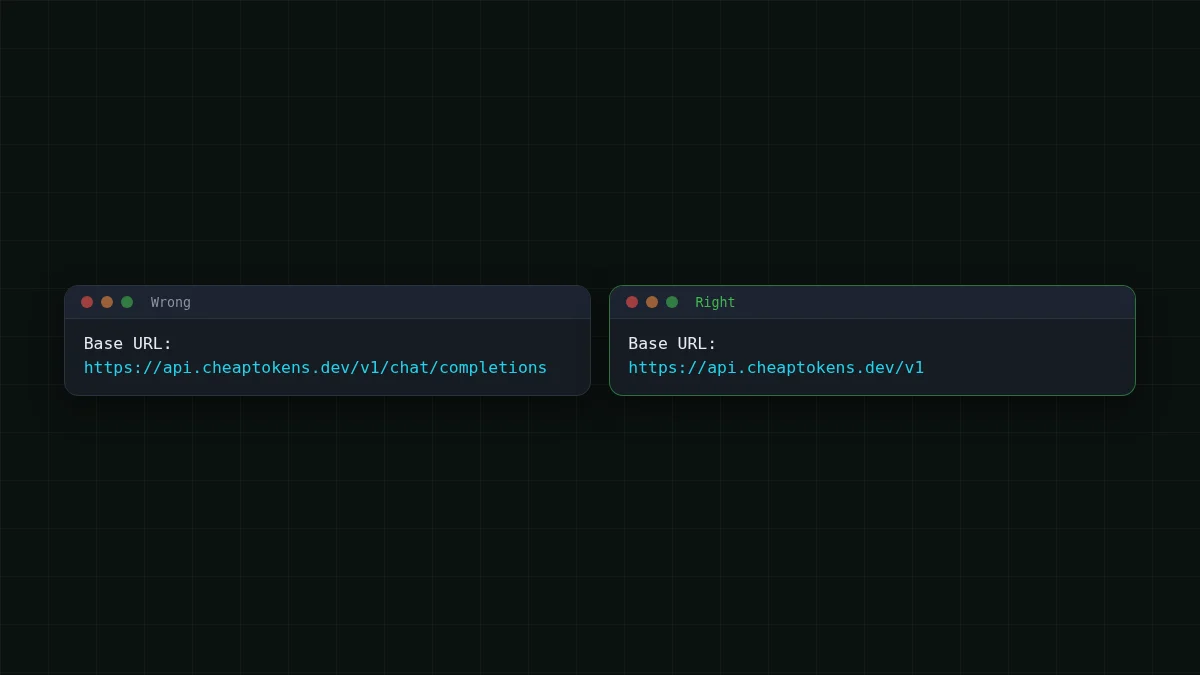
Enter the API root, not the full endpoint: https:/. The docs' own example is a root ending in /v1, and AnythingLLM adds / itself. If you paste the full path, requests go to the wrong address.
API key
Paste your CheapTokens key. If you don't have one yet, create it in the dashboard first. Treat it like a password: don't put it in a screenshot or a shared workspace note.
Chat model name
Use the full id, for example deepseek- or zai-. The short names you see in price tables are not accepted by the API. Not sure which id you have? List the models with GET /v1/models.
Model context window
The budget AnythingLLM uses when it builds a prompt from your question, retrieved document chunks and chat history. Enter the model's real window: 380000 for DeepSeek-V4-Flash, 390000 for GLM-5.3-Flash.
Max Tokens
The ceiling on the length of one answer. AnythingLLM's default is 1024. Enter 32768 for DeepSeek-V4-Flash or 8192 for GLM-5.3-Flash.
Save, open a workspace, and ask a question. Embeddings (the part that turns your documents into searchable chunks) are a separate setting in AnythingLLM, so the provider above only changes which model writes the answers.
Why the two limits matter#
Imagine you drop a 60-page contract into a workspace and ask for a summary of the termination clauses. With the defaults, two things go wrong. The context window you typed may be far smaller than the model's real one, so AnythingLLM trims what it sends. And Max Tokens sits at 1024, so a long summary stops mid-sentence.
The fix is to tell AnythingLLM the truth about the model:
Scroll the table right →
| Model (id) | Context window | Output per answer |
|---|---|---|
DeepSeek-V4-Flash (deepseek-) |
380K | up to 32,768 tokens |
GLM-5.3-Flash (zai-) |
390K | up to 8,192 tokens |
A habit worth keeping: Max Tokens is a ceiling, not a target. A short question still gets a short answer; you only pay for tokens the model actually writes. If you want to understand what happens when a limit is hit, why an AI answer stops mid-sentence walks through finish_reason and max_tokens, and what a context window is covers the input side.
The AnythingLLM docs also say that setting Max Tokens to 0 leaves the output limit out of the request. An explicit number is easier to reason about, so I'd type one.
Check the connection outside AnythingLLM#
If the chat window shows an error, it helps to know whether the problem is the key and model id or something inside AnythingLLM. Send one request straight to the API:
curl https://api.cheaptokens.dev/v1/chat/completions \
  -H "Authorization: Bearer $CHEAPTOKENS_API_KEY" \
  -H "Content-Type: application/json" \
  -d '{"model": "deepseek-ai/DeepSeek-V4-Flash-0731", "messages": [{"role": "user", "content": "Say hi in five words."}], "max_tokens": 50}'
The API is OpenAI Chat Completions compatible, so a working reply has the text in choices[0]., a finish_reason, and a usage block with the token counts for that request. If you get those, the key, the Base URL and the model id are fine, and whatever you see in AnythingLLM comes from the settings above. More on the endpoint is in the CheapTokens docs.
What a question to your documents costs#
Document chat is input-heavy: every question carries the retrieved chunks. Say you retrieve six chunks of about 600 tokens each, add the question and a little history, and land near 4,000 input tokens, with a 400-token answer. On DeepSeek-V4-Flash, one such question costs $0.0001. Here is the same workload across models for 200 questions, with the OpenRouter column next to it:
| Model | Input $/1M | Output $/1M | Per request | 200 requests | OpenRouter, 200 requests |
|---|---|---|---|---|---|
| GLM-5.3-Flash | $0.02 | $0.04 | $0.000096 | $0.0192 | $0.0334 |
| DeepSeek-V4-Flash | $0.015 | $0.10 | $0.0001 | $0.02 | $0.0672 |
| MiniMax-M2.7 | $0.05 | $0.15 | $0.00026 | $0.052 | $0.624 |
4,000 input and 400 output tokens per request. Prices per 1M tokens are current and change together with our tariffs; the OpenRouter column shows reference prices for the same workload.
In total, with input and output counted together, DeepSeek-V4-Flash comes out cheaper than OpenRouter on this workload. For your own numbers, drag the sliders: tokens per question and questions per day are all it needs.
Cost calculator
One day of questions to your documents
Input tokens per request: 4,000 · Output tokens per request: 400 · Requests per day: 50
| Model | Per day | Per month |
|---|---|---|
| GLM-5.3-Flash$0.02$0.04 | $0.0048 | $0.144 |
| DeepSeek-V4-Flash$0.015$0.10 | $0.005 | $0.15 |
| MiniMax-M2.7$0.05$0.15 | $0.013 | $0.39 |
The number of chunks you send is the biggest lever. What a RAG question costs shows how the bill moves with it, and current rates are on the pricing page.
If it doesn't work#
Most failures are one of four things. Match the symptom to the cause:
Match the pairs
Match each symptom to its cause
Tap an item on the left, then its pair
- The provider rejects the request and complains about max_tokensSet GENERIC_OPEN_AI_MODEL_MAX_TOKEN_KEY to max_completion_tokens and restart AnythingLLM
- 401 UnauthorizedThe API key is missing, mistyped or pasted with a space
- 404 or "model not found"The model id is the short name, not the full id from the model list
- Answers stop mid-sentenceMax Tokens is still the default 1024
The GENERIC_ option comes from AnythingLLM's docs: it changes which field name carries the limit in the request. For 401 and 404 in detail, see API 401 or 404: wrong key, base URL or model id.
Using another chat client? The steps are close to Open WebUI, LibreChat and Cherry Studio: one OpenAI-compatible base URL, one key, one full model id.


