Tools & integrationsGuide
Connect Cherry Studio to CheapTokens: custom provider, Base URL
Add a custom provider in Cherry Studio: the Base URL with the trailing slash, API key, model id and Model Check, plus fixes for 401 and 404.
On this page
To use CheapTokens in Cherry Studio, add a custom provider (Settings → Model Provider → Add Provider), put https:/ in the OpenAI Base URL field, paste your API key and add the model id deepseek- by hand. Then check the key with Model Check and say hello. That's the whole job; the only detail that bites is the slash at the end of the URL.
You open a desktop chat app because you want one window for several models and one balance behind them, not a browser tab per service. Cherry Studio is built for that: it's an open-source AI workstation for Windows, macOS and Linux (AGPL-3.0 Community Edition) with chat, agents and knowledge bases, and it accepts any OpenAI-compatible service as a custom provider. CheapTokens speaks the OpenAI Chat Completions format, so it fits. The steps below follow the Cherry Studio docs page on custom providers, checked on 7 November 2026; the app itself changes, so if a label has moved, look for the same word nearby.
What you need before you open the app#
Three things, all short:
- the Base URL:
https:/(with the trailing slash — the reason is in the next section);/ api. cheaptokens. dev/ v1/ - an API key from your CheapTokens account, kept somewhere you can copy it from, not pasted into a shared note;
- the full model id. The short name from the price list is not accepted by the API; use the gateway id, for example
deepseek-. The other ids are in the list-models guide and in the CheapTokens docs.ai/ DeepSeek- V4- Flash- 0731
Add the custom provider#
Open Settings (the gear icon), then Model Provider. At the bottom of the provider list is + Add Provider. Click it and the Add Custom Provider dialog appears.
Fill it like this:
Scroll the table right →
| Field | What to enter |
|---|---|
| Provider Name | CheapTokens (any name you will recognise) |
| API Key | your CheapTokens key |
| OpenAI Base URL | https:/ |
Cherry Studio shows 'OpenAI' and 'Anthropic' endpoint fields by default. Fill in only the protocol you actually use; for a normal chat that's the OpenAI one, and the Anthropic field can stay empty. Under each Base URL field the app shows a preview of the final request path. Read it. It's the fastest way to catch a wrong address before you send anything.
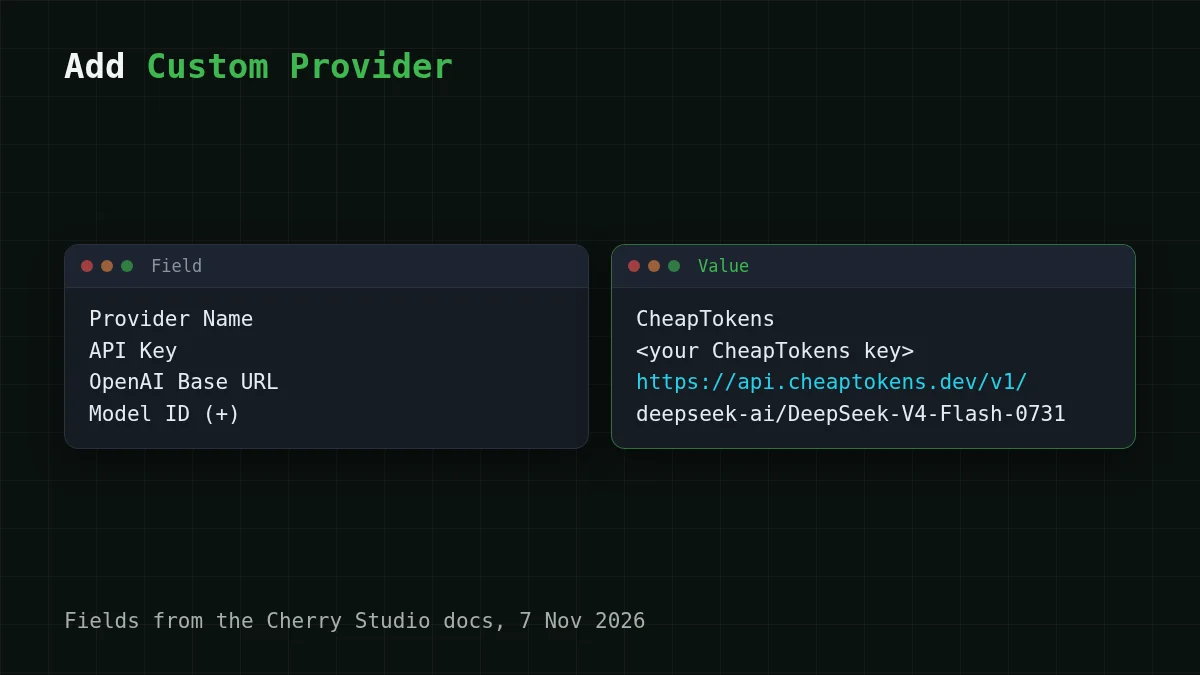
Click Add to save.
Why the trailing slash matters#
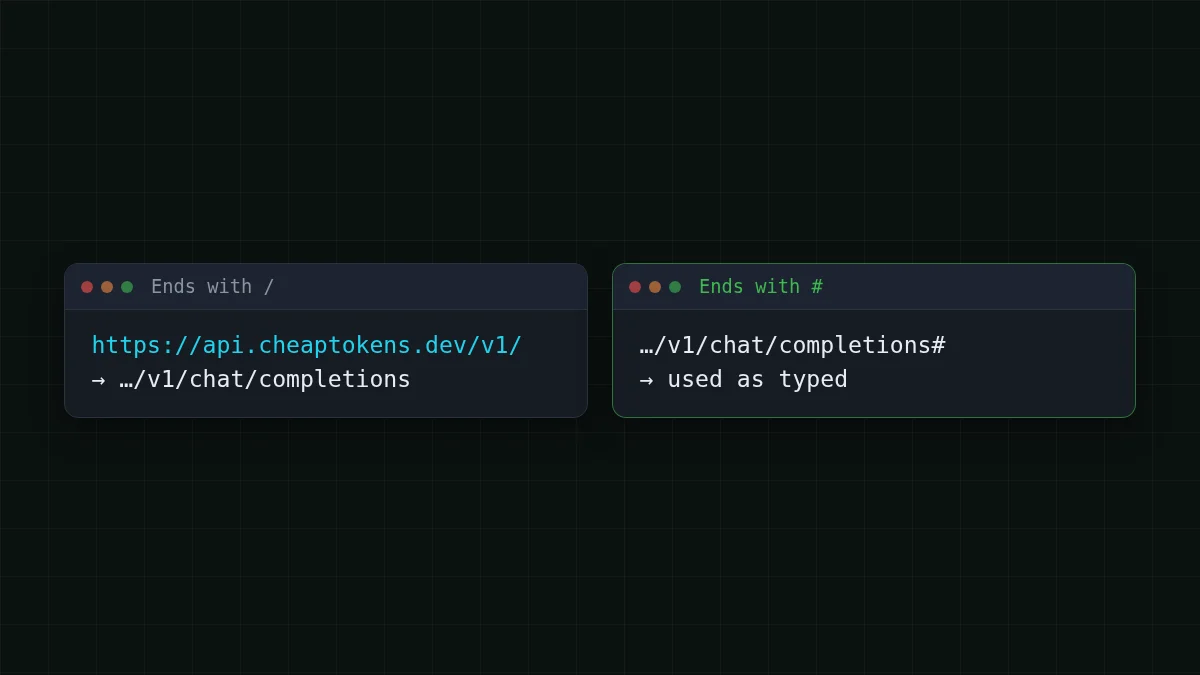
Cherry Studio builds the request URL from your Base URL by three rules in its docs (checked 7 November 2026):
- a root address like
https:/gets/ example. com /appended;v1/ chat/ completions - an address ending with
/gets onlychat/completionsappended; - an address ending with
#is used exactly as typed, with nothing added.
CheapTokens lives under /v1, so https:/ is the form that turns into https:/ — the path the API expects. The preview under the field should read exactly that. If you see /v1/v1/ or no /v1 at all, fix the field before going on.
Key, model and Model Check#
Back on the provider's page there are five small steps. Do them in this order:
Put in order
Connect the provider in this order
Drag the items or use the arrows
- Turn on the provider's enable switch (top right of its page)
- Enter the API key
- Click Model Check to verify the key
- Check the Base URL
- Add the model id with the + button in model management
A note on step 5. The page also has a Sync models button that fetches a model list from the service. The reliable route is to add the id yourself with +: type deepseek- exactly, with the deepseek-ai/ part. Which models you can add:
Scroll the table right →
| Model | Model id to type | Context | Max answer |
|---|---|---|---|
| DeepSeek-V4-Flash | deepseek- |
380K | 32,768 tokens |
| GLM-5.3-Flash | zai- |
390K | 8,192 tokens |
| MiniMax-M2.7 | MiniMaxAI/ |
180K | 8,192 tokens |
Model Check is the button next to the key field; according to the Cherry Studio docs, it checks that the key is valid. If it complains, jump to the error section below: the cause is usually one of three fields.
Send the first message#
Open a new chat, pick the CheapTokens provider and the model you added in the model selector at the top, and write something short, like 'Explain what a token is in two sentences.' A reply from the model means the whole chain works: key, address, model id.
Want to see a request without the app? Here is a plain Chat Completions call:
export CHEAPTOKENS_API_KEY="paste-your-key-here"

curl https://api.cheaptokens.dev/v1/chat/completions \
  -H "Authorization: Bearer $CHEAPTOKENS_API_KEY" \
  -H "Content-Type: application/json" \
  -d '{"model": "deepseek-ai/DeepSeek-V4-Flash-0731", "messages": [{"role": "user", "content": "Explain what a token is in two sentences."}]}'
The reply is JSON with the text in choices[0]. and the token counts in usage.
Which model to put in a desktop chat#
A chat window is a different job from an agent loop: you ask, read, ask again. Two things then matter: how long the answers can be and how big a conversation fits.
- DeepSeek-V4-Flash — the default pick for general chat and long documents: up to 32,768 output tokens per answer, 380K context, one price at any hour. In total, with input and output counted together, it is cheaper than OpenRouter.
- GLM-5.3-Flash — everyday chat with the largest window of the three (390K), cheaper than OpenRouter on both input and output.
- MiniMax-M2.7 — chat and agent-style tasks with a 180K context, cheaper than OpenRouter on both sides.
All three sit behind one balance, so you can add all three ids to the same provider and switch in the model selector without touching the key.
What a chat session costs#
Here's a rough picture. Say you have a 20-message conversation. Every message resends the earlier history, so a request averages about 6,000 tokens in and 500 tokens out (a reason covered in why a long chat costs more). One request on DeepSeek-V4-Flash costs $0.00014. Twenty of them are in the calculator below; move the sliders to match your own chats.
Cost calculator
One 20-message chat session
Input tokens per request: 6,000 · Output tokens per request: 500 · Requests per day: 20
| Model | Per day | Per month |
|---|---|---|
| GLM-5.3-Flash$0.02$0.04 | $0.0028 | $0.084 |
| DeepSeek-V4-Flash$0.015$0.10 | $0.0028 | $0.084 |
| MiniMax-M2.7$0.05$0.15 | $0.0075 | $0.225 |
The table below runs the same session on all models, with an OpenRouter column for comparison:
| Model | Input $/1M | Output $/1M | Per request | 20 requests | OpenRouter, 20 requests |
|---|---|---|---|---|---|
| GLM-5.3-Flash | $0.02 | $0.04 | $0.00014 | $0.0028 | $0.0049 |
| DeepSeek-V4-Flash | $0.015 | $0.10 | $0.00014 | $0.0028 | $0.0098 |
| MiniMax-M2.7 | $0.05 | $0.15 | $0.00038 | $0.0075 | $0.09 |
6,000 input and 500 output tokens per request. Prices per 1M tokens are current and change together with our tariffs; the OpenRouter column shows reference prices for the same workload.
For current prices per 1M tokens see CheapTokens pricing.
If it doesn't work#
Most problems come from the same three fields: key, URL, model id. Match what you see to the cause:
Match the pairs
Match the symptom to the likely cause
Tap an item on the left, then its pair
- 401 UnauthorizedThe API key is missing, mistyped or has a stray space
- 404 Not FoundThe Base URL is wrong: the path preview does not end in /v1/chat/completions
- The app reports an unknown modelLikely the model id is the short name; type the full id with the prefix
- The app reports insufficient balanceLikely the balance is empty and needs a top-up
For a longer walkthrough of these errors, see API 401 or 404: wrong key, base URL or model id. And if you prefer a browser-based chat instead of a desktop app, Open WebUI works the same way.
Sources: Cherry Studio docs, custom provider and provider settings pages, checked 7 November 2026; the project is at github.com/CherryHQ/cherry-studio.


