AI for beginnersGuide
Test your prompt on 20 cases: exact-match grading in Python
Build a 20-case test set, grade a prompt by exact match with a short Python script, and see whether a prompt change actually helped.
On this page
Your prompt worked on the two messages you tried. Does that mean it works? Not yet. Run it on 20 real messages with known answers, count how many it gets right, and read the ones it misses. A short Python script does the counting, and when you change the prompt, the same script tells you whether the change helped instead of leaving it to your gut.
Anthropic's documentation on defining success criteria and building evaluations (checked 7 November 2026) puts it in its own words: make the tests specific to your task, include the awkward cases, and prefer many automatically graded questions to a few graded by hand. Below is the smallest version of that which you can run today.
Build the test set: 20 messages and the answer you expect#
Say you sort customer messages into three piles: positive, negative or mixed. Open a file called cases.csv and write down 20 messages you could really receive, each with the label you would give it. Write the labels before you run anything. If you copy the model's answers as "correct", the test can only agree with the model.
text,label
"Arrived a day early and works perfectly. Thank you!",positive
"The charger stopped working after two days.",negative
"Great screen, but the battery barely lasts until lunch.",mixed
"Support answered in five minutes and fixed it.",positive
"I waited three weeks and nobody replied.",negative
"Oh great, another update that deletes my settings.",negative
"Nice design. Pity about the price.",mixed
"Exactly what I ordered.",positive
"The box was crushed, but the headphones inside are fine and sound great.",mixed
"Refund took 10 days. Never again.",negative
"Love it!!",positive
"Cheaply made, but honestly it does the job for the price.",mixed
"Worst purchase of the year.",negative
"Five stars. Would buy again.",positive
"Fast delivery, wrong colour.",mixed
"It's fine. Not amazing, not terrible.",mixed
"Zero issues in six months of daily use.",positive
"The app crashes every time I open the camera.",negative
"Thanks for nothing.",negative
"Setup was a pain, but once it ran, it's been rock solid.",mixed
Look at the mix: 6 positive, 7 negative, 7 mixed. The sarcastic lines ("Oh great, another update…", "Thanks for nothing.") and the borderline one ("It's fine. Not amazing, not terrible.") are there on purpose. A set made only of obvious messages scores 100% and teaches you nothing. Take the real ones from your own inbox, tickets or chat export; the edge cases are the ones you already know are annoying.
Why 20? It is a starting size, not a number from the docs (their example uses 1,000 tweets). Twenty is small enough to write by hand in half an hour and big enough that one lucky answer doesn't decide the score.
The script: send each case, compare, print the misses#
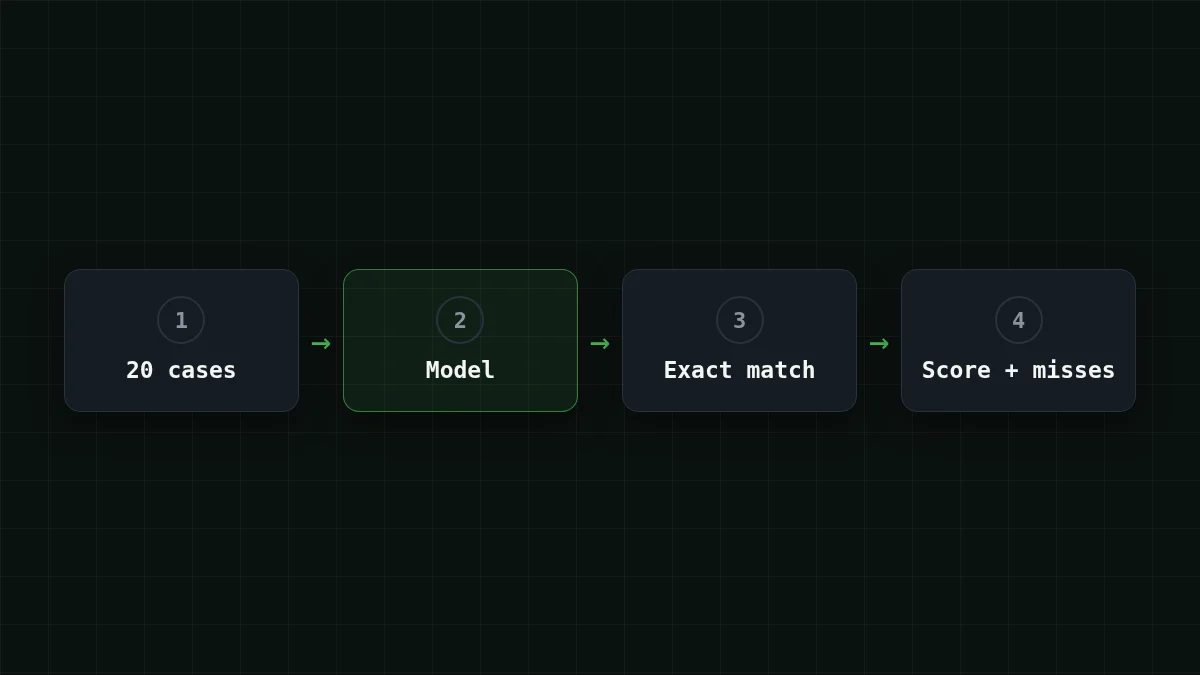
The plan has four steps, and the code follows it line by line.
Put in order
Put the eval loop in order
Drag the items or use the arrows
- Load the 20 cases from the CSV
- Send each message to the model with your prompt
- Compare the answer with your label
- Print the accuracy and the cases that failed
The loop only works when the labels exist before the first model call, and the failures come last because they are what you read and act on.
Install the SDK with pip install openai and keep the key in an environment variable called CHEAPTOKENS_. Any OpenAI-compatible API works the same way; here the script points at CheapTokens and GLM-5.3-Flash (setup details are in the docs).
import csv
import os
from openai import OpenAI

client = OpenAI(
    base_url='https://api.cheaptokens.dev/v1',
    api_key=os.environ['CHEAPTOKENS_API_KEY'],
)
MODEL = 'zai-org/GLM-5.3-Flash'

PROMPT = (
    'Classify the customer message as positive, negative or mixed. '
    'Answer with one word only.'
)


def ask(text):
    r = client.chat.completions.create(
        model=MODEL,
        temperature=0,
        max_tokens=100,
        messages=[
            {'role': 'system', 'content': PROMPT},
            {'role': 'user', 'content': text},
        ],
    )
    return r.choices[0].message.content or ''


with open('cases.csv', newline='', encoding='utf-8') as f:
    cases = list(csv.DictReader(f))

correct, failed = 0, []
for case in cases:
    got = ask(case['text'])
    ok = got.strip().strip('.').lower() == case['label']
    correct += ok
    if not ok:
        failed.append((case['text'], case['label'], got.strip()))

print(f'Accuracy: {correct}/{len(cases)} = {correct / len(cases):.0%}')
for text, want, got in failed:
    print(f'- {text!r}: expected {want}, got {got!r}')
Three details are worth a second look.
temperature=0keeps the answers as steady as possible, so a change in the score comes from your prompt and not from dice.max_tokens=100is far more than a one-word label needs. If an answer ever comes back empty or cut off, checkfinish_reason; the finish_reason "length" guide shows what to raise.- The grading line is the docs' recipe,
strip().lower()compared with the right answer, plus one addition: it also drops a trailing full stop, because "Negative." and "negative" are the same answer to you.
What do you see when it runs? One accuracy line, then one line per miss. Say the first run prints this:
Accuracy: 14/20 = 70%
- 'Oh great, another update that deletes my settings.': expected negative, got 'positive'
- "It's fine. Not amazing, not terrible.": expected mixed, got 'positive'
…
(The numbers here are an assumption to show the shape of the output; yours will differ.) Sarcasm and borderline wording are the kind of messages a short prompt tends to miss. The point is that you no longer guess: you have a list.
Change one thing, run again#
Now the useful part. Read the misses, pick a cause, change the prompt in one place and rerun. One change at a time, otherwise you won't know which edit moved the score.
Compare
Prompt v1 → v2: add a rule and two examples
v1
Classify the customer message as positive, negative or mixed.
Answer with one word only.
v2
Classify the customer message as positive, negative or mixed.
Sarcasm counts as negative. Praise plus a complaint is mixed.
Answer with one word only.

Message: Lovely colour, but it arrived with a scratch.
Answer: mixed

Message: Sure, thanks a lot. Now my order is lost.
Answer: negative
The two examples are invented, and that is deliberate. Never put a message from cases.csv into the prompt as an example: the model would then be graded on an answer you handed it, and the score would be inflated. This is the few-shot technique; the test set is what tells you whether it paid off. If your v1 prompt is still vague, how to write a good prompt is the place to start before you measure.
Paste v2 into PROMPT (triple quotes work for several lines) and run the script again. Say it prints Accuracy: 17/. Three more cases are right, so v2 looks better. How much to trust that? Each case is worth 5 points in a 20-case set, so 70% → 85% is three messages. That is a good hint, not proof. If the score drops, you've learned something just as valuable and saved yourself from shipping a worse prompt.
Same set, another model: does it hold the score?#
The same file answers a second question: are you paying for more model than this task needs? Change one line and run again:
MODEL = 'deepseek-ai/DeepSeek-V4-Flash-0731'If the accuracy on your 20 cases matches, you have your answer for this task, from your own data rather than from a leaderboard. If it drops, look at which messages broke before you decide anything.
What does all this cost? Assume about 150 input tokens per case (the instruction plus the message) and about 5 output tokens for a one-word label. That is 3,000 input and 100 output tokens per run of 20 cases, which comes to $0.000064 on GLM-5.3-Flash. Ten re-runs of the set are 200 requests; the table below shows that workload for every model, with OpenRouter next to it. At this workload, with input and output counted together, every model in the table costs less than OpenRouter's reference price.
| Model | Input $/1M | Output $/1M | Per request | 200 requests | OpenRouter, 200 requests |
|---|---|---|---|---|---|
| GLM-5.3-Flash | $0.02 | $0.04 | $0.0000032 | $0.00064 | $0.0011 |
| DeepSeek-V4-Flash | $0.015 | $0.10 | $0.0000028 | $0.00055 | $0.0022 |
| MiniMax-M2.7 | $0.05 | $0.15 | $0.0000083 | $0.0017 | $0.0198 |
150 input and 5 output tokens per request. Prices per 1M tokens are current and change together with our tariffs; the OpenRouter column shows reference prices for the same workload.
Two of them are used in this article: GLM-5.3-Flash has a 390K context and up to 8,192 output tokens per answer; DeepSeek-V4-Flash has a 380K context and up to 32,768 output tokens, one price at any hour of the day, and the same balance as every other model. Current prices are on the pricing page, the full list is in models.
Where exact match stops working#
Exact match works because the right answer is one word from a fixed list. For open-ended output such as summaries, rewrites or explanations, there is no single string to compare with. The docs describe another route, grading by a model, and recommend using a different model as the grader than the one that wrote the answer. Start with exact match anyway: wherever you can force a short, fixed answer, it is the cheapest and clearest test you can run. The docs' rule of thumb is that more automatically graded questions beat fewer hand-graded ones.
One more habit: when v2 stops improving, don't keep polishing against the same 20 messages. Add 5–10 new ones, ideally real misses from production, and run again.
Quick check
v2 scores 17/20 and v1 scored 15/20 on the same cases. What is the safest conclusion?
Show answer
Answer: v2 looks better, but two cases out of 20 is a small gap: add new cases and rerun
Each case is 5 points, so a two-case gap is a signal to look closer, not a verdict. New cases that v2 has never seen are the next check.


