TroubleshootingGuide
json.JSONDecodeError on an LLM reply: extract the JSON in Python
json.loads fails on a model reply? Read exc.pos and finish_reason to find the cause, then extract the JSON with raw_decode and retry once.
On this page
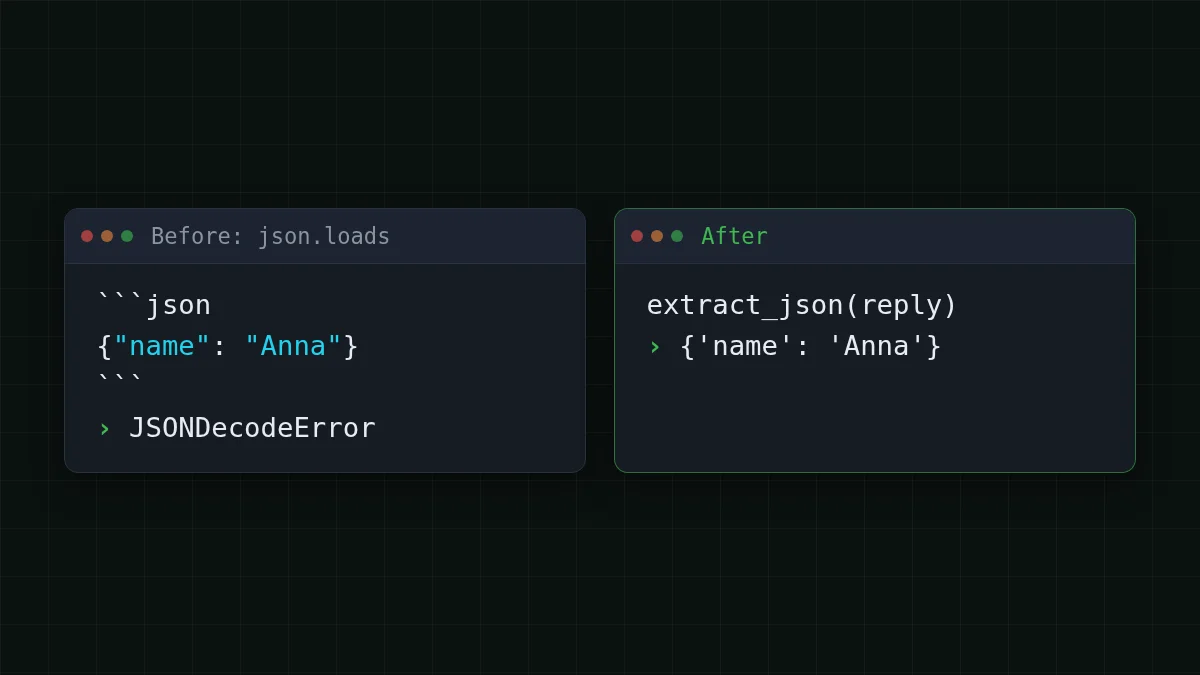
Your script asks the model for JSON, calls json. and dies with json.. Usually the model did answer: it wrapped the JSON in a ```json fence, put a line of chat in front of it, or ran into max_tokens halfway through. Look at exc.pos and finish_reason to tell which one it is, pull the object out with JSONDecoder., and retry once if nothing can be saved.
Three ways a reply breaks json.loads#
Python's json documentation (Python 3.15 docs, checked 2 November 2026) says JSONDecodeError is a subclass of ValueError with the attributes msg, doc, pos, lineno and colno. The one that matters here is pos: the index in the string where parsing failed.
Say a script pulls fields out of customer emails and asks for {"name": .. These three strings are the replies that break it. Paste them into a Python shell:
import json

fenced = '```json\n{"name": "Anna", "age": 31}\n```'
chatty = 'Sure! Here is the JSON:\n{"name": "Anna", "age": 31}'
cut = '{"name": "Anna", "age": 31'

for reply in (fenced, chatty, cut):
    try:
        json.loads(reply)
    except json.JSONDecodeError as exc:
        print(exc.pos, len(reply))
The first two fail at pos 0: the parser looked at the very first character, a backtick or an S, and gave up. The third fails at the end of the string (pos equals len(reply)): everything it read was fine, then the text ran out. That difference is your diagnosis. Position 0 means the JSON is probably there, just wrapped. Position at the end means the answer stopped early.
Cut-off answers: check finish_reason before you parse#
A reply that stops in the middle is not a parsing problem, it is a length problem. The API tells you: the choice has finish_reason, and "length" means the answer was cut by max_tokens (the full story is in AI answer cut off? Fix finish_reason "length" and max_tokens). Look at it first, before any extraction.
There is a nasty trap if you skip that step. A scanner that hunts for the first parseable { can pick up a complete inner object from a half-finished outer one, and your script carries on with the wrong data and no error. Try it:
Try it yourselfTry it: what does a "find the first object" function return for this cut reply?Show answer
Take '{"user": {"name": "Anna"}, "age": 31'. The outer object never closes, but the inner {"name": "Anna"} is complete, so the extractor below returns {'name': 'Anna'}. No exception, wrong result. That is why the finish_reason check comes before extraction.
The fix for a real cut-off is more room: raise max_tokens. DeepSeek-V4-Flash allows up to 32,768 output tokens per answer, GLM-5.3-Flash up to 8,192, so a long JSON list has more space on the first one. Details of the models are on the CheapTokens models page.
Pull the JSON out of the text#
For fences and chatter, the standard library already has the tool. According to the same Python page, JSONDecoder. decodes a JSON document from a string that begins with one and returns the object plus the index where the document ended. The docs say it can be used on a string with extraneous data at the end. It needs the document to start at the first character, so cut the leading text off first: look for a {, try to decode from there, and move on to the next { if that fails.
import json

def extract_json(text):
    """Return the first JSON object found in text, or raise ValueError."""
    decoder = json.JSONDecoder()
    for i, ch in enumerate(text):
        if ch == '{':
            try:
                obj, _end = decoder.raw_decode(text[i:])
                return obj
            except json.JSONDecodeError:
                continue
    raise ValueError('no JSON object in the reply')
It handles the fence (the leading ```json is skipped because it is not a {), the sentence before the object, and text after the closing brace. Expecting a list? Look for '[' instead. Don't look for both: a stray [1] in a sentence like "see note [1]" is valid JSON and would win.
Two things it deliberately does not do. It never edits the text (no regex that deletes backticks, no guessing at missing brackets), so you cannot turn a broken reply into valid but wrong data. And it fails loudly when there is nothing to find, which is what the retry below needs.
Retry once with a stricter prompt#
If the reply was cut or contains no object at all, ask again. Once, not in an endless loop. On a cut-off, give the second attempt more room; otherwise say plainly what you want. This uses the OpenAI Python SDK against the CheapTokens base URL (https:/) and the full model id from the docs; the key sits in an environment variable.
import os
from openai import OpenAI

client = OpenAI(
    base_url='https://api.cheaptokens.dev/v1',
    api_key=os.environ['CHEAPTOKENS_API_KEY'],
)
MODEL = 'deepseek-ai/DeepSeek-V4-Flash-0731'
STRICT = '\n\nReply with one JSON object only. No text before or after it, no code fence.'

def ask_json(prompt, max_tokens=800):
    content = prompt
    for attempt in (1, 2):
        resp = client.chat.completions.create(
            model=MODEL,
            messages=[{'role': 'user', 'content': content}],
            max_tokens=max_tokens,
        )
        choice = resp.choices[0]
        if choice.finish_reason == 'length':
            max_tokens *= 2          # cut off: more room next time
        else:
            try:
                return extract_json(choice.message.content or '')
            except ValueError:
                pass                 # no object: try the stricter prompt
        content = prompt + STRICT
    raise ValueError('no valid JSON after one retry')
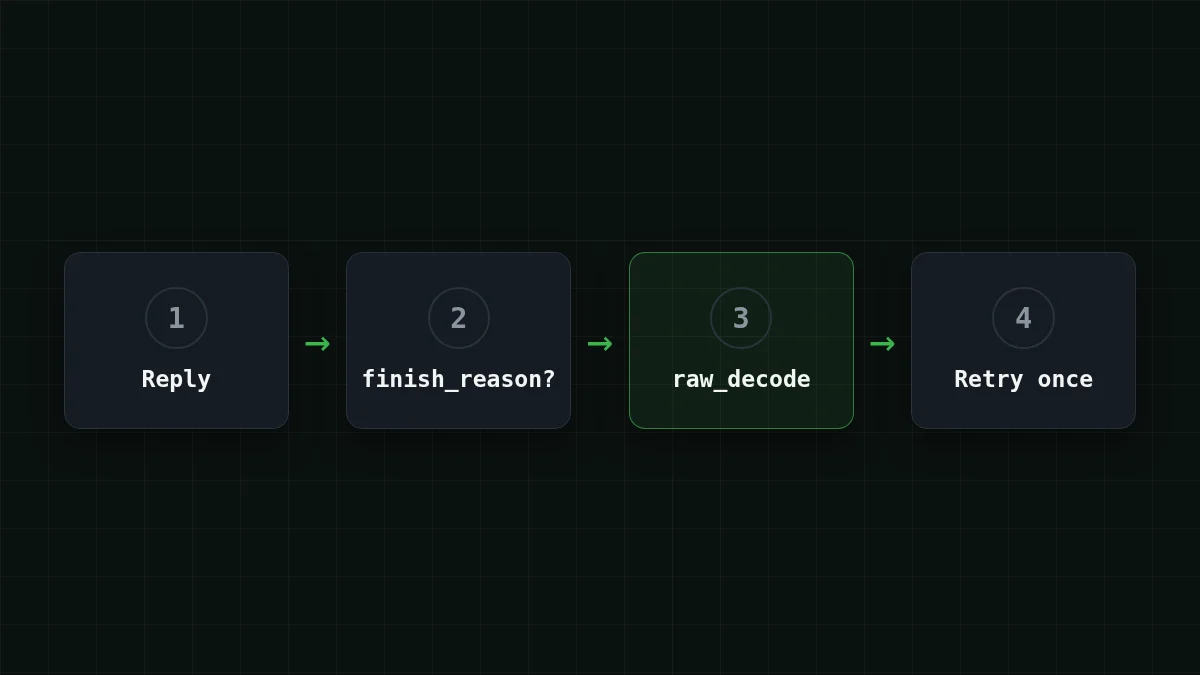
The order is the point: finish_reason first, extraction second, and only then a retry. Raise the error after the second attempt so a batch job can log that item and move on.
What a retry costs is easy to estimate. Assume a request of 1,200 input tokens and 300 output tokens (an assumption, use your own numbers): $0.000048 on DeepSeek-V4-Flash or $0.000036 on GLM-5.3-Flash. If 30 of 1,000 requests need the second attempt, the extra bill is 30 × that request, $0.0014 on DeepSeek-V4-Flash. Prices are live, they come from the current price list.
Put in order
Put the repair steps in order
Drag the items or use the arrows
- Check finish_reason: stop here if it says length
- Find the first { and cut the text before it
- Decode with raw_decode and ignore what follows
- If nothing was found, retry once with the stricter prompt
Which symptom, which fix#
The steps above fit in your head until the next odd error shows up. This is the same thing as a lookup: find what you see on screen and read the fix.
Pick your case
Pick what you see
Choose an option to see the answer
json.loads fails at pos 0
The reply starts with a fence or a sentence. Run it through extract_json; a retry is not needed.
pos is at the end of the string
The answer stopped early. Check finish_reason: if it is length, raise max_tokens and ask again.
The error is somewhere in the middle
The model wrote broken JSON itself (a missing comma, a trailing comma, an unescaped quote). Don't patch it: retry once with the stricter prompt and log the reply if it fails again.
json.loads works but a key is missing
Parsing is fine, the content is not. List the exact keys in the prompt and check them in code after parsing.
Can the API force valid JSON?#
Sometimes. OpenAI's structured outputs guide documents two modes: JSON mode (type: json_), which returns valid JSON but does not follow a schema, and Structured Outputs (type: json_, strict: true), which does; OpenAI recommends the second where possible (source: developers.openai.com, checked 2 November 2026). Those are OpenAI's own API options. Before relying on response_format with another endpoint, check the CheapTokens docs; the extraction and retry above work with plain chat completions and need no special parameter. More on the request-side options in Get valid JSON from an LLM API: response_format and retries.
Before you ship the parser, check four things: finish_reason is read before the text is parsed, there is only one retry (and the second failure is logged with the item id), the code checks that the expected keys exist after parsing, and max_tokens leaves room for the longest JSON you expect.
Next time json.loads throws, print exc.pos and finish_reason first. Those two numbers usually tell you what happened before you read a line of the reply.


