Getting startedGuide
First request to CheapTokens in Python with requests, no SDK
A 20-line Python script with only requests: one chat completion, a timeout, HTTP error handling, and the answer, finish_reason and usage printed.
On this page
You don't need the openai package to talk to an OpenAI-compatible API. One requests.post call, a Bearer key and a JSON body are enough, and you get to see exactly what goes over the wire. This guide builds that script for CheapTokens (https:/) and ends with it printing the answer, finish_reason and token usage.
It's a good fit if you're on a locked-down machine where only requests is installed, if a small cron job shouldn't pull in an SDK, or if you simply want to understand what the SDK does for you. The first-request guide covers the SDK, curl and Node routes; this is the plain-Python one.
The whole script#
Put your key in an environment variable first (see how to store an API key safely), then save this as ask.py:
import os
import requests

url = "https://api.cheaptokens.dev/v1/chat/completions"
headers = {"Authorization": f"Bearer {os.environ['CHEAPTOKENS_API_KEY']}"}
payload = {
    "model": "deepseek-ai/DeepSeek-V4-Flash-0731",
    "messages": [
        {"role": "user", "content": "Explain what a token is in two sentences."}
    ],
    "max_tokens": 200,
}

try:
    r = requests.post(url, headers=headers, json=payload, timeout=30)
    r.raise_for_status()
except requests.exceptions.Timeout:
    raise SystemExit("No reply within 30 seconds - try again or raise the timeout")
except requests.exceptions.HTTPError as e:
    raise SystemExit(f"HTTP {e.response.status_code}: {e.response.text}")

data = r.json()
choice = data["choices"][0]
print(choice["message"]["content"])
print("finish_reason:", choice["finish_reason"])
print("usage:", data["usage"])
Run python ask.py. The model id is the full gateway id, deepseek-; if you're unsure what to put there, list the models with GET /v1/models. To try another model, swap in zai- and change nothing else: one balance covers all models.
What each line is doing#
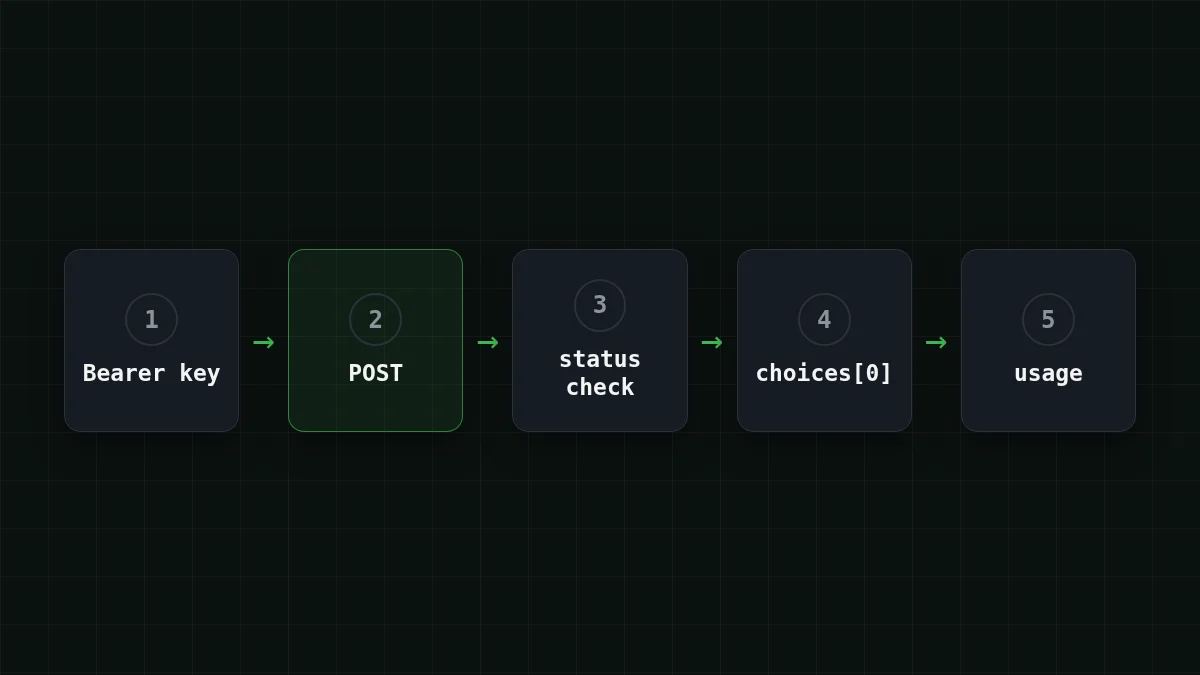
Here are the five ideas the script leans on. The requests Quickstart (living docs, checked 2 November 2026) explains most of them, and the Chat Completions reference from OpenAI defines the fields in the reply.
Flashcards
Five things in the script
Tap a card to flip it
The third bullet is the one people skip. A script that hangs forever in a cron job is much worse than one that fails loudly after 30 seconds.
Read the reply#
A successful response is JSON. The parts you care about, per the Chat Completions reference:
choices[0].is the text. It can bemessage. content null, so don't call string methods on it blindly.choices[0].says why the model stopped:finish_ reason stop(it finished),length(themax_tokenslimit cut it off),tool_calls,content_filter.usage.,prompt_ tokens usage.andcompletion_ tokens usage.are what you're billed for: input, output, and their sum.total_ tokens
The reply has this shape (the numbers are placeholders):
{
  "choices": [
    {
      "message": {"role": "assistant", "content": "A token is a small piece of text..."},
      "finish_reason": "stop"
    }
  ],
  "usage": {"prompt_tokens": 18, "completion_tokens": 52, "total_tokens": 70}
}
Try it yourselfTry it: set max_tokens to 5 and run the script again. What does finish_reason say?Show answer
It says length: the model was stopped by your max_tokens limit, so the answer ends mid-sentence. Raise the limit and you get stop again. The full story is in AI answer cut off? Fix finish_reason "length".
When it doesn't work#
The script turns most failures into one line of output. Here is what each one usually means:
Match the pairs
Match each message to its usual cause
Tap an item on the left, then its pair
- HTTP 401The key is missing, mistyped or not the one you meant to send
- HTTP 404The URL path or the model id is wrong
- requests.exceptions.TimeoutNo bytes arrived within the timeout
- KeyError: 'CHEAPTOKENS_API_KEY'The environment variable isn't set in this terminal
For the actual error bodies and a step-by-step check of key, base URL and model id, use API 401 or 404 error: wrong key, base URL or model id. Two smaller gotchas: if you see KeyError: 'choices', you parsed an error body as a success, which means raise_ was skipped. And if your machine has a ~/.netrc file, requests can use its credentials instead of the Authorization header you set.
What one call costs#
With the placeholder numbers from the reply above (about 18 tokens in, 52 out), one call to DeepSeek-V4-Flash costs $0.0000055. That's a number you can't feel, so scale it up. Say your script summarizes 1,000 support tickets a day, roughly 800 tokens in and 300 out each:
| Model | Input $/1M | Output $/1M | Per request | 1,000 requests | OpenRouter, 1,000 requests |
|---|---|---|---|---|---|
| GLM-5.3-Flash | $0.02 | $0.04 | $0.000028 | $0.028 | $0.0517 |
| DeepSeek-V4-Flash | $0.015 | $0.10 | $0.000042 | $0.042 | $0.098 |
| MiniMax-M2.7 | $0.05 | $0.15 | $0.000085 | $0.085 | $1.02 |
800 input and 300 output tokens per request. Prices per 1M tokens are current and change together with our tariffs; the OpenRouter column shows reference prices for the same workload.
Prices are fixed per model, with no peak hours, so the same script costs the same at 3 a.m. and at noon. Current per-model prices are on the pricing page, and the docs list the endpoints.
Where to go from here#
Once this works, the usual next steps are a loop over many inputs, a retry on 429 (see 429 Too Many Requests: retries with backoff), or the same call with streaming. If you'd rather not manage HTTP yourself, the SDK route is one base_url change away.


