AI for beginnersGuide
How to choose an AI model: context, output, speed, price
Pick a model for chat, coding or an agent with four numbers: context window, max output, speed and price. Worked examples and a live cost table.
On this page
A model list with forty names, a task described in one sentence, and no obvious link between the two. Here is the short answer: check four numbers, in this order. Context window and maximum output decide whether a model can do your task at all. Speed and price decide how pleasant and how expensive it is. Context, output limit and price are listed on the models page and in the pricing table; speed you check yourself in about a minute, and the script is below.
The four numbers in plain words#
Think of the model as a colleague at a desk. The context window is the size of the desk: everything that has to be in front of them at once. The maximum output is how long they can talk in one go. Speed is how quickly they start answering. Price is their hourly rate. Four terms, and you will meet all of them in every API doc:
Flashcards
Words you'll meet in every model list
Tap a card to flip it
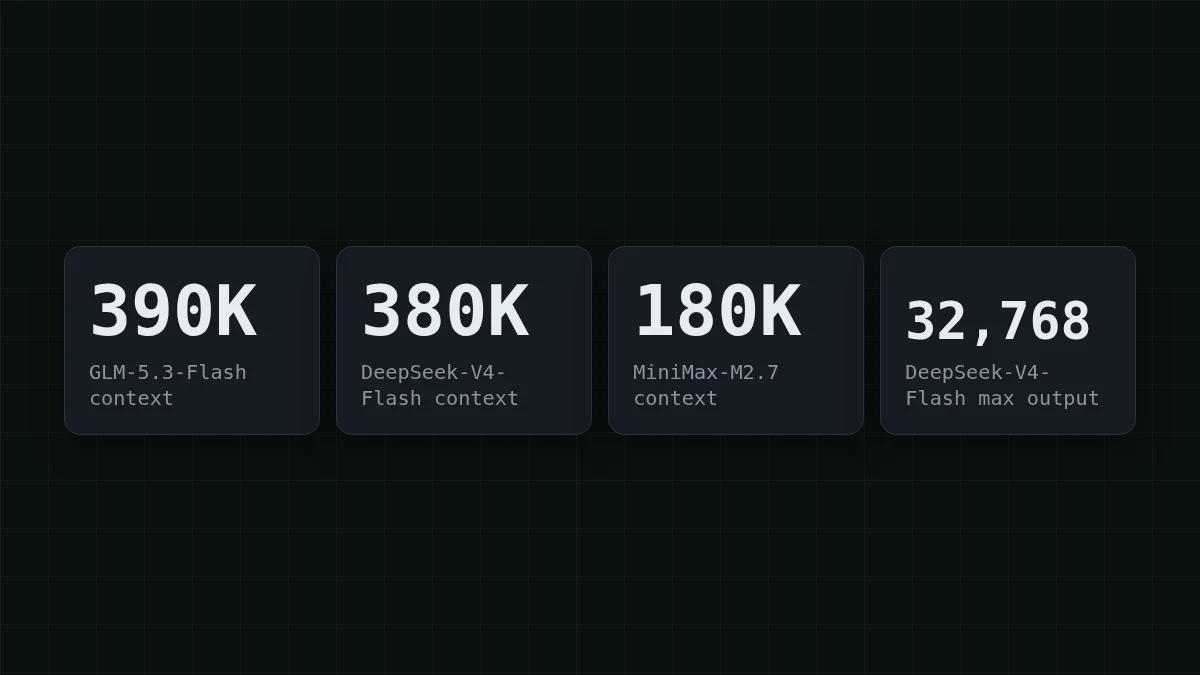
To make this concrete, here are the first two numbers for the three models in the CheapTokens catalog, from the CheapTokens model reference (27 October 2026): GLM-5.3-Flash has a 390K context and answers up to 8,192 tokens; DeepSeek-V4-Flash (release 0731) has 380K and answers up to 32,768 tokens; MiniMax-M2.7 has 180K and answers up to 8,192 tokens.
Context: will everything you send fit?#
Say your coding assistant opens 12 files of about 3,000 tokens each, then adds your question and its own notes. 12 × 3,000 = 36,000 tokens. Even the smallest window above, 180K, holds that with plenty of room. A single huge file or a whole repository dump is where the window starts to matter.
Chats and agents are trickier, because the API resends the whole history with every call. Take an agent that runs 20 steps, and each step adds about 2,000 tokens of tool output and reply (an assumption for this example). Step 1 sends 2,000 tokens, step 2 sends 4,000, step 20 sends 40,000. Over the whole run it sends 2,000 × 210 = 420,000 tokens, where 210 is 1 + 2 + … + 20.
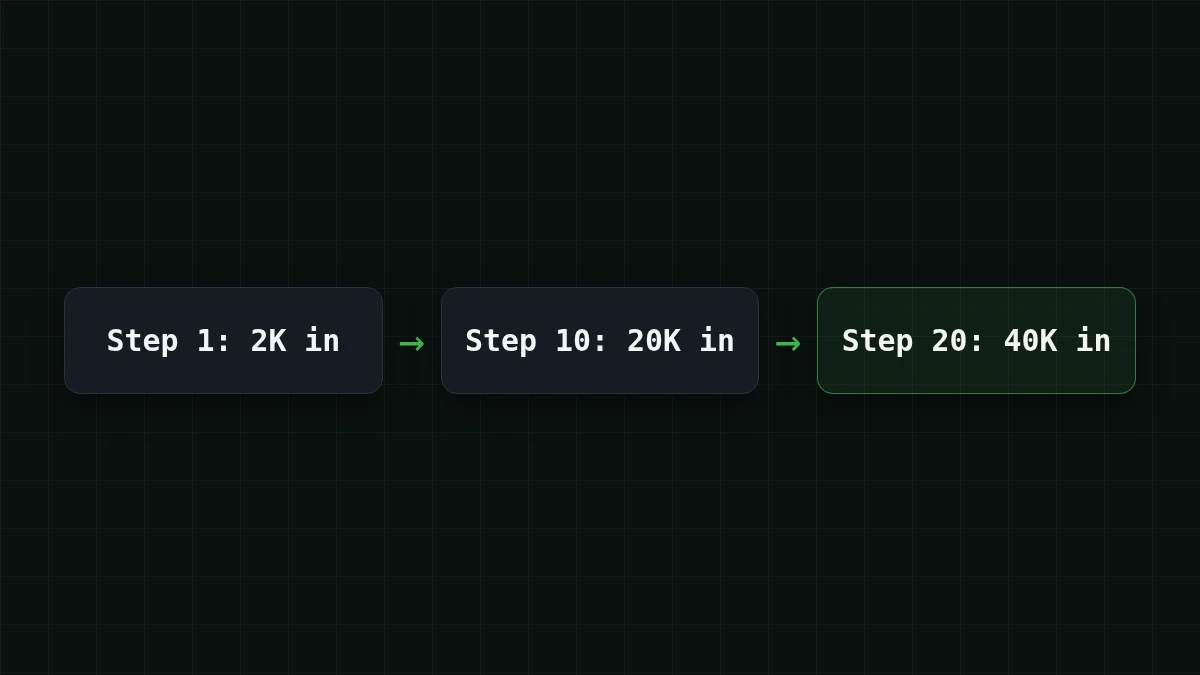
Two different questions hide here. The context window only cares about the biggest single request: 40,000 tokens at step 20, which every model in the catalog holds easily. The bill cares about the total, 420,000 tokens. Keep both in your head, and you won't pick a model for the wrong reason.
Output length: the limit that cuts answers short#
The output limit is a ceiling on one reply, and it is easy to forget until an answer stops mid-sentence. A rule of thumb for English: one token is about three-quarters of a word. You ask for a report of 6000 words: 6000 / 0.75 = 8000 tokens. That just fits under 8,192. Ask for 7,000 words and the text ends in the middle of a paragraph.
With a 32,768-token ceiling the same arithmetic works out to 24576 words in one answer (32768 × 0.75 = 24576), so generated code, long reports and drafts of whole chapters fit in a single reply. When a reply does get cut, the API tells you: finish_reason comes back as length (why that happens and how to fix it).
Quick check
You ask a model with an 8,192-token output limit for a 12,000-word report. What do you get?
Show answer
Answer: A report that stops midway, with finish_reason set to length
12,000 words is about 16,000 tokens, twice the cap. The model writes until it hits the ceiling and stops, and the API marks the reply with finish_.
Speed: the one number you measure yourself#
Speed is really two numbers: how long until the first text appears, and how fast the rest streams in. Both move with load, prompt length and time of day, so a figure copied from a table is a poor guide. Measure it on your own prompt. This takes a minute and uses a few tokens (the key comes from an environment variable; see the docs for creating one):
import os, time
from openai import OpenAI

client = OpenAI(
    base_url="https://api.cheaptokens.dev/v1",
    api_key=os.environ["CHEAPTOKENS_API_KEY"],
)

start = time.perf_counter()
first = None
stream = client.chat.completions.create(
    model="deepseek-ai/DeepSeek-V4-Flash-0731",
    messages=[{"role": "user", "content": "Explain what a token is in 3 sentences."}],
    stream=True,
)
for chunk in stream:
    if first is None and chunk.choices and chunk.choices[0].delta.content:
        first = time.perf_counter() - start
total = time.perf_counter() - start
print(f"first text after {first:.1f}s, finished after {total:.1f}s")
You get one line: first text after <N>s, finished after <M>s. Swap the model id for zai- or MiniMaxAI/, run each a few times, and you have a speed comparison for your prompt. Does it matter? For a live chat, yes: people notice a pause before the first word. For a nightly batch of summaries, nobody is watching, and speed drops to the bottom of your list.
Price: add input and output together#
Prices are quoted per million tokens, but you pay per request, and a request has both an input side and an output side. So compare models on a workload, not on two columns. Say your support bot handles 1,000 tickets a day, each about 300 tokens in and 150 out (an assumption; replace it with your own). The table is live and recalculates from current prices:
| Model | Input $/1M | Output $/1M | Per request | 1,000 requests | OpenRouter, 1,000 requests |
|---|---|---|---|---|---|
| GLM-5.3-Flash | $0.02 | $0.04 | $0.000012 | $0.012 | $0.0238 |
| DeepSeek-V4-Flash | $0.015 | $0.10 | $0.00002 | $0.0195 | $0.0378 |
| MiniMax-M2.7 | $0.05 | $0.15 | $0.000038 | $0.0375 | $0.27 |
300 input and 150 output tokens per request. Prices per 1M tokens are current and change together with our tariffs; the OpenRouter column shows reference prices for the same workload.
Read the total, not the columns. In total, with input and output counted together, each of the three comes out cheaper than OpenRouter's reference price in that table's OpenRouter column.
And here is where agents bite. The 20-step run from the context section sends 420,000 tokens in and writes maybe 4,000 out (200 per step, again an assumption). On DeepSeek-V4-Flash one such run costs $0.0067. Five runs in a day? Move the sliders and watch the three models:
Cost calculator
A day of agent work: five 20-step tasks
Input tokens per request: 21,000 · Output tokens per request: 200 · Requests per day: 100
| Model | Per day | Per month |
|---|---|---|
| GLM-5.3-Flash$0.02$0.04 | $0.0428 | $1.28 |
| DeepSeek-V4-Flash$0.015$0.10 | $0.0335 | $1.01 |
| MiniMax-M2.7$0.05$0.15 | $0.108 | $3.24 |
The model prices stay the same at any hour of the day, so a calculation you do now holds for the evening batch too. For a refresher on why output tokens usually cost more than input, see input and output tokens.
Pick a model by task#
Start from the task, find the number that bites hardest, and check the other three afterwards. Click through your own case:
Pick your case
Which model for my task?
Choose an option to see the answer
A support bot with short answers
Questions and answers are short, so every model in the catalog has room to spare, and the price column decides. Run your typical ticket through the cost table above and start with GLM-5.3-Flash or MiniMax-M2.7, whichever total looks better for your numbers.
A coding assistant that reads many files
Context comes first. GLM-5.3-Flash has the largest window of the three at 390K, DeepSeek-V4-Flash has 380K. MiniMax-M2.7 at 180K is enough when the files you send together stay well under that.
An agent that loops over many steps
History is resent at every step, so the total grows fast. DeepSeek-V4-Flash combines a 380K context with up to 32,768 output tokens per answer and one price at any hour, which keeps long loops predictable. Check the total with the calculator above.
Long reports and generated code
Max output decides. DeepSeek-V4-Flash writes up to 32,768 tokens per answer; GLM-5.3-Flash and MiniMax-M2.7 write up to 8,192, which covers a report of about 6,000 words.
No single model wins every row, which is why it helps to run the same ten real prompts through two candidates before you commit. The GLM vs DeepSeek vs MiniMax comparison goes deeper on the three models, and the pricing page always shows the current numbers.


